
The best portable gaming handhelds depend on whether you want PC games, streamed PS5 or cloud play, or a pocketable retro library. My best overall pick is the ASUS ROG Xbox Ally, which offers a Windows gaming library in a handheld format; the Retroid Pocket 6 stands out for its AMOLED display and Android versatility, while the PlayStation Portal is purpose-built for remote PS5 play. The main tradeoffs are performance versus battery life, screen size versus portability, and local play versus a reliable internet connection. This roundup also includes simpler retro systems for buyers who want classic games without a PC-style setup. Read on for the full comparison and guidance on choosing the right kind of handheld.

Get the latest gadgets delivered free with Prime
- Fast, free delivery on millions of items
- Prime Video, Amazon Music and more included
- Member-only deals all year
Complete the kit



Key Takeaways
- Handheld category matters more than screen size: the ROG Xbox Ally and Legion Go S are PC-style systems, while the Portal and abxylute OnePro depend on streaming; retro models focus on simpler, locally stored play.
- The ROG Xbox Ally is the strongest all-around fit in this lineup for PC and Xbox-PC gaming: the Retroid Pocket 6 is more compact and Android-based, but does not serve the same Windows game library.
- The Legion Go S trades pocketability for a larger 8-inch screen: its display suits home or travel sessions where a bag is available, while 4-inch retro handhelds are easier to carry.
- Retroid’s Pocket 6, Pocket Flip 2, and Pocket 5 offer different priorities: the Pocket 6 emphasizes a 120Hz AMOLED screen, the Flip 2 adds a clamshell design, and the Pocket 5 offers a simpler Android handheld format.
- Retro game counts are not a reliable measure of fit: game licensing, controls, screen comfort, and whether the system plays the titles you want matter more than a large advertised library.




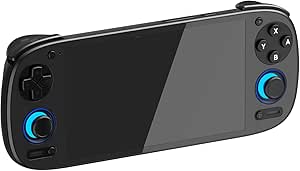


| portable gaming handheld | Display | Storage | Battery | Weight |
|---|---|---|---|---|
| Anbernic RG40XX H Retro Handhe | 4-inch IPS LCD, 640 × 480 | 64 GB | 3200 mAh; up to 8 hours of gameplay | About 200 g (7.2 oz) |
| Retroid Pocket 6 Handheld Game | 5.5-inch AMOLED, 1920 × 1080, 120 Hz | 128 GB UFS 3.1; microSD expansion up to 2 TB | 6000 mAh with 27 W fast charging | 320 g (11.3 oz) |
| RS36MAX Retro Handheld Game Co | 4-inch IPS, 720 × 720 | 64 GB TF card | 4000 mAh; up to 5–7 hours of gameplay | 7.2 oz |
| PlayStation Portal Remote Play | — | — | — | 2.6 pounds |
| 2026 5-Inch HD Retro Handheld | 5-inch IPS | — | — | 16 oz |
| My Arcade Atari Pocket Player | 2.75-inch full-color LCD, vertical | — | — | 4 ounces |
| ASUS ROG Xbox Ally Gaming Hand | 7-inch 1080p IPS touchscreen, 120Hz, up to 500 nits | 512GB SSD; microSD support | 60Wh | Listing states 2 pounds; description states 1.47 pounds |
| Lenovo Legion Go S | 8-inch 1080p PureSight IPS touchscreen, 120Hz with VRR | 512GB | 55.5Wh | — |
| Retroid Pocket Flip 2 Android | 5.5-inch 1080p AMOLED, 500 nits, 60Hz | 128GB UFS 3.1 | 5,000mAh | — |
| Retroid Pocket 5 Android Handh | 5.5-inch 1080p touchscreen | 128GB, expandable by microSD | 5,000mAh | — |
| abxylute OnePro Cloud Gaming H | 7-inch touchscreen | 64 GB | — | 430 g |
| RG56PRO Retro Handheld Game Co | 5.5-inch IPS, 1280 × 720 | 128GB TF card | 5000mAh; up to 8 hours advertised, 6 hours listed average | 7.2 ounces |
| Handheld Linux Gaming Console | 4-inch IPS | 64GB TF card, expandable up to 128GB | 4000mAh rechargeable | 8 ounces |
| Boltz Retro Handheld Game Cons | 3.75-inch IPS, 720 × 720 | — | — | — |
| My Arcade Atari Gamestation Go | 7-inch full-color, 720p | 5 GB | Built-in rechargeable battery | — |
More Details on Our Top Picks
Anbernic RG40XX H Retro Handheld Game Console, 4-Inch IPS Screen, 64 GB
The Anbernic RG40XX H suits buyers who want a straightforward retro handheld that stays easy to carry: at about 200 g, it is much lighter than the 320 g Retroid Pocket 6. Its 4-inch IPS screen and dual joysticks give classic games room to breathe without making the device bulky, while Wi-Fi, Bluetooth, and controller support add flexibility for home play. The tradeoff is modest hardware: 1 GB of RAM and a 640 × 480 display point this toward older systems rather than demanding emulation or modern Android games. Its stated battery life of up to eight hours is longer than the RS36MAX’s stated five to seven hours, but neither figure removes the need to plan around charging. Choose it for portability and simple retro play, not performance headroom.
Pros:- About 200 g, making it lighter than the Retroid Pocket 6
- 4-inch IPS screen with dual joystick controls
- Battery rated for up to eight hours of gameplay
- Wi-Fi, Bluetooth, HD output, and wired or wireless controller support
Cons:- 1 GB of RAM limits performance headroom
- 640 × 480 resolution is modest beside the Retroid Pocket 6’s 1080p display
Best for: Retro players who want a light, pocket-friendly Linux handheld for older games and occasional TV or controller use.
Not ideal for: Buyers seeking demanding emulation, modern Android gaming, or a high-resolution screen; its 1 GB RAM and 640 × 480 display are limiting.
- Platform:Linux
- Display:4-inch IPS LCD, 640 × 480
- Processor:Quad-core ARM Cortex-A53
- Memory:1 GB RAM
- Storage:64 GB
- Battery:3200 mAh; up to 8 hours of gameplay
- Connectivity:Wi-Fi, Bluetooth, HD output
- Weight:About 200 g (7.2 oz)
Our verdict“Pick the RG40XX H for lightweight Linux-based retro gaming, but choose a more powerful handheld for demanding systems or sharper visuals.”
Retroid Pocket 6 Handheld Game Console, 8GB RAM + 128GB Storage, Android 13, Snapdragon 8 Gen 2, 5.5″ 120Hz AMOLED Display, Light Purple
The Retroid Pocket 6 is the performance pick here, pairing a Snapdragon 8 Gen 2 with 8 GB of RAM for demanding emulators and Android games that sit beyond the intended scope of simpler Linux models such as the Anbernic RG40XX H. Its 5.5-inch, 1080p AMOLED screen runs at 120 Hz, so motion and contrast get a clear upgrade over the RG40XX H’s 640 × 480 IPS panel. Hall effect sticks are designed to resist drift, and active cooling helps manage sustained play. The cost of that capability in a portable format is a 320 g body—heavier than the Anbernic—and Android requires buyers to supply their own games and apps. The 6000 mAh battery is substantial, but high-performance play can still make battery planning relevant.
Pros:- Snapdragon 8 Gen 2 and Adreno 740 GPU target demanding games and emulators
- 5.5-inch 1080p AMOLED display with a 120 Hz refresh rate
- Hall effect analog sticks are designed to resist stick drift
- 6000 mAh battery, active cooling, and microSD expansion up to 2 TB
Cons:- At 320 g, it is heavier than the Anbernic RG40XX H
- No games are preloaded, so buyers must set up their own library
- Battery protection mode after inactivity may require charging to wake the device
Best for: Android gamers and emulation enthusiasts who want strong performance, a high-refresh AMOLED screen, and expandable storage in a handheld.
Not ideal for: Buyers who want a very light device, preloaded games, or a simple plug-and-play Linux retro console.
- Operating system:Android 13
- Processor:Qualcomm Snapdragon 8 Gen 2
- GPU:Adreno 740
- Memory:8 GB LPDDR5x
- Storage:128 GB UFS 3.1; microSD expansion up to 2 TB
- Display:5.5-inch AMOLED, 1920 × 1080, 120 Hz
- Battery:6000 mAh with 27 W fast charging
- Connectivity:Wi-Fi 7, Bluetooth 5.3, USB-C DisplayPort output
- Weight:320 g (11.3 oz)
Our verdict“Choose the Retroid Pocket 6 if you want premium Android performance and screen quality more than the lightest possible carry.”
RS36MAX Retro Handheld Game Console, Retro Gaming Console, 4.0″ IPS, Purple
The RS36MAX distinguishes itself from the Anbernic RG40XX H by advertising 20,000+ built-in games and support for more than 20 emulators, making it the more immediately stocked choice for buyers who value a large retro library. Its 4-inch IPS display uses a square 720 × 720 resolution, unlike the Anbernic’s 4:3 640 × 480 panel; that shape may suit some games and menus better, though display dimensions alone do not guarantee compatibility or image quality. The RK3326 processor, dual joysticks, and shoulder buttons provide a familiar control layout, while the 4000 mAh battery is rated for five to seven hours. The main caveat is that built-in game counts and performance vary by title, and its heavier claimed weight of 7.2 ounces is not lighter than the Anbernic.
Pros:- Advertised library of 20,000+ games and support for 20+ emulators
- 4-inch IPS screen with 720 × 720 resolution
- Dual joysticks and L1/L2 and R1/R2 shoulder buttons
- 4000 mAh battery rated for five to seven hours
Cons:- Game compatibility and performance may vary by title
- Stated battery life is shorter than the Anbernic RG40XX H’s up-to-eight-hour rating
- Built-in game count does not establish the quality or suitability of every included title
Best for: Retro players who want a Linux handheld advertised with a large built-in game library and dual sticks for classic titles.
Not ideal for: Buyers who prioritize a verified game library, strong performance for newer systems, or a long stated battery runtime.
- Platform:Linux
- Processor:RK3326 64-bit quad-core
- Display:4-inch IPS, 720 × 720
- Storage:64 GB TF card
- Advertised game library:20,000+ games
- Emulator support:20+ emulators
- Battery:4000 mAh; up to 5–7 hours of gameplay
- Weight:7.2 oz
Our verdict“Choose the RS36MAX if its advertised preloaded library is your priority, but favor the Anbernic RG40XX H for a longer stated battery runtime.”
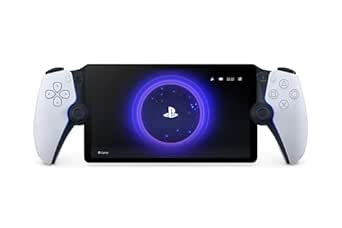
PlayStation Portal Remote Player for PS5
The PlayStation Portal is the clearest choice for players who already own a PS5 and want its games on a dedicated handheld screen. Its 8-inch 1080p display is much larger than the 5.5-inch screen on the Retroid Pocket 6, and supported titles retain DualSense haptics and adaptive triggers. That makes it a different proposition from the standalone retro and Android consoles in this list: the Portal streams compatible games rather than serving as an independent gaming system. It needs a PS5 and Wi-Fi for remote play, while select cloud streaming requires PlayStation Plus Premium. At 2.6 pounds, it is also far heavier than the compact handhelds here, so the large screen comes at a real carrying and setup cost. VR and peripheral-dependent games are not supported.
Pros:- Large 8-inch 1080p screen for streamed PS5 play
- Supports DualSense haptics and adaptive triggers in compatible games
- Can stream compatible PS5 games and select titles through PlayStation Plus Premium
- Includes a 3.5 mm audio jack and PlayStation Link support
Cons:- Remote play requires a PS5 console and Wi-Fi
- Select cloud streaming requires a PlayStation Plus Premium membership
- At 2.6 pounds, it is substantially heavier than the Retroid Pocket 6
Best for: PS5 owners who want to play compatible console games around the home on a large handheld screen.
Not ideal for: Travelers without dependable Wi-Fi, buyers without a PS5, or anyone seeking an independent handheld with locally installed games.
- Compatible console:PlayStation 5
- Screen:8-inch LCD, 1080p
- Maximum frame rate:Up to 60 fps
- Connectivity:Wi-Fi
- Controller features:DualSense haptic feedback and adaptive triggers in supported games
- Audio:PlayStation Link or 3.5 mm audio jack; Tempest 3D AudioTech in supported games
- Weight:2.6 pounds
- Dimensions:14 × 3.88 × 6 inches
Our verdict“The Portal makes sense for PS5 owners who want a large-screen remote-play companion, not for buyers seeking a standalone portable console.”
2026 5-Inch HD Retro Handheld Game Console, Portable Arcade System with TV Output and Classic Game Support
This 5-inch CherryQuest handheld gives retro games more screen area than the 4-inch Anbernic RG40XX H and RS36MAX, while remaining a self-contained device for travel or downtime. Its IPS display, dual analog sticks, directional pad, and ergonomic grip cover a broad range of control styles; video output also offers a way to play on a compatible TV. The listed formats span arcade and older console families through PS1, but the product notes that compatibility and performance vary by title. That qualification matters: unlike the Retroid Pocket 6, this listing provides no processor, RAM, storage, or battery specifications to help buyers judge performance or endurance. At one pound, it is also much heavier than the Anbernic. It is a screen-and-format-focused retro option, not a clearly documented performance pick.
Pros:- 5-inch IPS screen is larger than the 4-inch displays on the Anbernic RG40XX H and RS36MAX
- Dual analog sticks, directional pad, tactile action buttons, and ergonomic grip
- Supports a range of listed classic formats, including PS1
- Video output enables play on a compatible television
Cons:- Processor, RAM, storage, and battery capacity are not specified
- Game compatibility and performance may vary by title
- At 16 ounces, it is heavier than the Anbernic RG40XX H
Best for: Retro players who want a 5-inch IPS screen, dual sticks, and the option to connect the handheld to a compatible TV.
Not ideal for: Buyers who need published performance, memory, storage, or battery details, or who want a lightweight device for frequent carrying.
- Display:5-inch IPS
- Controls:Dual analog sticks, directional pad, action buttons
- Listed formats:MAME, FC, SFC, MD, GB, GBC, GBA, PCE, Atari, SMS, GG, NGPC, WSC, PS1
- TV connection:Video output; cable compatibility may vary
- Players:1
- Weight:16 oz
- Dimensions:8.03 × 0.87 × 4.02 inches
- Material:Plastic
Our verdict“Pick this CherryQuest model for its larger retro screen and TV output, but choose a better-documented handheld if performance or battery life is a priority.”
My Arcade Atari Pocket Player Pro Console with 100 Games
The Atari Pocket Player Pro is the simplest pick here: it comes with 100 built-in games, including 80 Atari 2600 titles and 20 bonus games, so there’s no app setup or library management. Its four-ounce body and 2.75-inch color screen make it easier to carry than the larger Windows handhelds, such as the ASUS ROG Xbox Ally. That portability comes with a narrow purpose, though: this is for single-player retro sessions, not modern games, streaming, or a broad emulation setup. The small vertical display and button-only controls are also less flexible than the Retroid Pocket 5’s touchscreen and analog controls. Power can come from four AA batteries or USB-C, but neither batteries nor a cable are included, and the stated battery option is not rechargeable.
Pros:- Includes 80 Atari 2600 games and 20 bonus retro titles
- Four-ounce design is easy to carry
- Can run on AA batteries or USB-C power
- 3.5mm headphone jack supports private listening
Cons:- Small screen and button-only controls limit comfort and game variety
- Batteries and USB-C cable are not included
- AA battery operation does not support rechargeable batteries
Best for: Atari collectors and retro players who want a lightweight handheld with games ready to play and no software setup.
Not ideal for: Players who want modern games, analog-stick controls, multiplayer, or a larger screen; its Atari-focused library and 2.75-inch display are limiting.
- Platform:Atari 2600
- Included games:100 (80 Atari 2600 titles and 20 bonus games)
- Display:2.75-inch full-color LCD, vertical
- Power:Four AA batteries (not included) or USB-C
- Weight:4 ounces
- Dimensions:5.8 × 1.5 × 2.8 inches
- Audio:Built-in speaker and 3.5mm headphone jack
- Warranty:120-day manufacturer warranty
Our verdict“Choose this if you want a compact, ready-to-play Atari collection, but skip it for a versatile handheld gaming library.”
ASUS ROG Xbox Ally Gaming Handheld, 7-inch 120Hz, AMD Ryzen Z2 A, 16GB RAM, 512GB SSD
The ASUS ROG Xbox Ally suits players who want a Windows gaming handheld with familiar controller-shaped grips and a fast, bright screen. Its 7-inch 120Hz touchscreen with FreeSync Premium is better suited to fluid motion than the Retroid Pocket 5’s 60Hz display, while Windows gives it a broader PC gaming role than the Atari Pocket Player Pro. The 16GB of memory and 512GB SSD provide room for a substantial installed library, but the product data does not give a specific battery runtime, so long sessions away from a charger are hard to plan. It is also considerably heavier than the compact Android models: the listing says two pounds, while the description gives 1.47 pounds. I’d favor it over the Lenovo Legion Go S for a 7-inch screen, but not for buyers prioritizing the largest display.
Pros:- 7-inch 1080p touchscreen with 120Hz refresh, FreeSync Premium, and 500-nit brightness
- Windows 11, 16GB RAM, and 512GB SSD support a broad PC gaming setup
- 60Wh battery supports fast charging
- Contoured grips are shaped around an Xbox-style controller feel
Cons:- Battery runtime is not specified, making away-from-outlet planning difficult
- Conflicting listed weights of 2 pounds and 1.47 pounds create uncertainty
- Larger and heavier than compact Android handhelds such as the Retroid Pocket 5
Best for: PC and Xbox-minded players who want Windows game access, controller-style grips, and a high-refresh 7-inch screen in a portable format.
Not ideal for: Travelers seeking the lightest handheld or anyone who needs a clearly stated long unplugged runtime; its listed weight is substantial and battery duration is unspecified.
- Operating system:Windows 11
- Processor:AMD Ryzen Z2 A
- Graphics:AMD RDNA 2
- Memory:16GB LPDDR5 6400MHz
- Storage:512GB SSD; microSD support
- Display:7-inch 1080p IPS touchscreen, 120Hz, up to 500 nits
- Battery:60Wh
- Connectivity:Wi-Fi 6E, Bluetooth 5.4, USB
- Weight:Listing states 2 pounds; description states 1.47 pounds
Our verdict“Pick the ROG Xbox Ally for Windows gaming and a smooth 7-inch display, provided its weight and unspecified battery runtime fit your travel habits.”
Lenovo Legion Go S (2025) Handheld Gaming Console, Ryzen Z2 Go, 16GB RAM, 512GB Storage, 8-Inch 120Hz Display, Glacier White
The Lenovo Legion Go S is the screen-first Windows option in this group. Its 8-inch 120Hz display gives game menus and small on-screen details more room than the 7-inch ASUS ROG Xbox Ally, while VRR and 500-nit brightness support a smoother, clearer view across changing scenes. That extra screen area makes the Go S less pocketable, and its 55.5Wh battery may still call for a charger during extended gaming. The included 65W adapter and rapid charging help with breaks between sessions, but do not remove the need to plan around power. Compared with the Retroid Pocket Flip 2, this is a larger Windows PC gaming device rather than a compact Android handheld. Its 16GB memory and 512GB storage offer a useful PC setup, though listed software update support timing is unknown.
Pros:- 8-inch 1080p touchscreen with 120Hz refresh, VRR, and 500-nit brightness
- 100% sRGB color accuracy supports vivid, consistent-looking visuals
- TrueStrike controllers have an ergonomic, anti-slip texture
- Rapid Charge Pro and the included 65W adapter support quick recharging
Cons:- Larger screen and Windows handheld design are less convenient to carry than compact Android options
- Battery life during gaming is not specified and may limit extended play away from power
- Software update support date is listed as unknown
Best for: Windows handheld players who value an expansive screen for PC games and menus more than pocket-sized portability.
Not ideal for: Commuters who need a compact device or players expecting long gaming sessions far from a charger; the large display and unspecified gaming runtime make those use cases less convenient.
- Platform:Windows
- Processor:AMD Ryzen Z2 Go
- Graphics:AMD Radeon
- Memory:16GB
- Storage:512GB
- Display:8-inch 1080p PureSight IPS touchscreen, 120Hz with VRR
- Battery:55.5Wh
- Charging:Rapid Charge Pro; 50% in 30 minutes, full charge in up to 90 minutes
- Included power adapter:65W
Our verdict“Choose the Legion Go S if a spacious, high-refresh display matters more than compact carry and you can accommodate charging breaks.”
Retroid Pocket Flip 2 Android Handheld Game Console, 5.5-Inch AMOLED 1080p Display, 128GB, Black
The Retroid Pocket Flip 2 stands out through its clamshell design: close it to protect the 5.5-inch AMOLED screen in a bag, then open it for Android gaming. Its 1080p, 500-nit display offers deeper contrast than the Lenovo Legion Go S’s IPS panel, though the Lenovo provides a larger 8-inch view and a 120Hz refresh rate; the Flip 2 is 60Hz. A Snapdragon 865, 8GB of RAM, and active cooling give this Android device more scope than the Atari Pocket Player Pro, but games are not preloaded. Buyers need to install apps and games through Google Play and handle their own setup. Hall-effect analog sticks are designed to resist drift, while Wi-Fi 6 and USB-C DisplayPort add flexibility. The tradeoff is a smaller screen and a battery whose runtime is not stated.
Pros:- Clamshell design helps protect the display during transport
- 5.5-inch 1080p AMOLED screen reaches 500 nits
- Hall-effect analog sticks are designed to resist drift
- Active cooling, Wi-Fi 6, and USB-C DisplayPort add gaming and connection flexibility
Cons:- Games are not preloaded and require app setup
- 60Hz screen is less fluid than the 120Hz panels on the ASUS ROG Xbox Ally and Lenovo Legion Go S
- Battery runtime is not specified
Best for: Android gaming and emulation fans who want a protected clamshell screen, analog controls, and a handheld they can configure through Google Play.
Not ideal for: Players who want games ready to play out of the box, a large high-refresh display, or a stated battery runtime.
- Operating system:Android 13
- Processor:Qualcomm Snapdragon 865
- Graphics:Adreno 650
- Memory:8GB LPDDR4x
- Storage:128GB UFS 3.1
- Display:5.5-inch 1080p AMOLED, 500 nits, 60Hz
- Battery:5,000mAh
- Controls:Gamepad with Hall-effect analog sticks
- Connectivity:Wi-Fi 6, Bluetooth 5.1, USB-C DisplayPort, 3.5mm audio
Our verdict“Pick the Flip 2 if a protective clamshell and Android flexibility matter more than a large screen or a ready-made game library.”
Retroid Pocket 5 Android Handheld Game Console, 128 GB, 5.5-Inch 1080p Touchscreen, Black
The Retroid Pocket 5 is a flexible Android handheld for players who want to combine emulators, Android apps, and cloud gaming in a compact 5.5-inch format. Its Snapdragon 865 and 1080p touchscreen give it a broader role than the Atari Pocket Player Pro’s fixed retro collection, while Wi-Fi 6 supports a connected play style that the Atari device does not offer. The microSD slot also makes storage easier to expand than the Flip 2’s listed 128GB capacity alone. The two Retroid models share a similar processor and screen size, but the Flip 2 adds a clamshell body, AMOLED display, and stated Hall-effect sticks; the Pocket 5 instead offers a straightforward touchscreen handheld with a stated matte finish. Neither includes games, so some setup is part of ownership. The battery protection behavior after long inactivity may also catch occasional players off guard.
Pros:- Supports emulators, Android apps, and cloud gaming
- 1080p touchscreen pairs with gamepad controls
- microSD slot allows storage expansion
- Compact design and matte finish suit portable play
Cons:- Games are not preloaded, so setup and library selection are up to the owner
- After extended inactivity, battery protection mode may require at least eight hours of charging to exit
- Unlike the Flip 2, the listed product details do not specify a clamshell screen cover or Hall-effect sticks
Best for: Players who want one compact Android handheld for emulators, downloaded apps, and cloud gaming, with room to expand storage.
Not ideal for: Buyers seeking a preloaded library or a device that can be left unused for long periods without a lengthy wake-up charge.
- Model:RP5
- Operating system:Android 13
- Processor:Snapdragon 865
- Graphics:Adreno 650
- Memory:8GB
- Storage:128GB, expandable by microSD
- Display:5.5-inch 1080p touchscreen
- Battery:5,000mAh
- Connectivity:Wi-Fi 6 and Bluetooth 5.1
Our verdict“Choose the Pocket 5 for a compact, expandable Android gaming setup, but skip it if you want games included or expect to leave it unused for long stretches.”
abxylute OnePro Cloud Gaming Handheld, 7-Inch 1080p Touchscreen, 64 GB, Black Transparent
The abxylute OnePro is a good fit for players who want a dedicated screen and controls for streaming games rather than a handheld built around local play. Its 7-inch 1080p touchscreen gives streamed games more room than the smaller display on the Boltz Retro Handheld, while support for Xbox Cloud Gaming, GeForce NOW, Luna, and PlayStation remote play offers several ways to access a library. Hall-effect joysticks and a stated battery life of over eight hours suit longer sessions away from an outlet. The tradeoff is dependence on a strong Wi-Fi connection: unlike the offline game libraries in the RG56PRO and Boltz, streaming can falter when the network does. I’d choose this for home or travel use with reliable Wi-Fi, not as a standalone retro console.
Pros:- Supports several cloud gaming and remote-play services
- 7-inch 1080p touchscreen provides ample room for streamed games
- Hall-effect joysticks and ergonomic grip
- Stated battery life exceeds eight hours
Cons:- Cloud gaming and remote play rely on a stable Wi-Fi connection
- Software update support date is unknown
Best for: Players with reliable Wi-Fi who want one handheld for cloud gaming and remote play across several services.
Not ideal for: Travelers who often play offline or buyers seeking a self-contained library of locally playable games.
- Platform:Android
- Display:7-inch touchscreen
- Resolution:1080p
- Refresh rate:60 Hz
- Storage:64 GB
- Battery life:Over 8 hours
- Weight:430 g
- Connectivity:Wi-Fi, USB, HDMI
Our verdict“Choose the OnePro for a large-screen streaming handheld if dependable Wi-Fi matters more to you than offline play.”
RG56PRO Retro Handheld Game Console with EVA Hard Case, 128GB
The RG56PRO suits buyers who want a broad retro library ready to play without leaning on cloud services. Its 128GB card and advertised collection of more than 31,000 preloaded games set it apart from the Boltz Retro Handheld’s 20,503-game listing and the Atari Gamestation Go’s curated set of more than 200 licensed titles. The 5.5-inch 720p IPS display, dual joysticks, and Hall-effect shoulder controls give it a more involved control layout than the simpler 4-inch Linux handheld in this roundup. Wi-Fi multiplayer and HDMI output add options, but both depend on compatible games or equipment. The listed average battery life is six hours, below the up-to-eight-hour claim, so I’d treat it as a portable retro library rather than assume all-day play. Its hard case is a useful extra for carrying it around.
Pros:- 128GB TF card and more than 31,000 advertised preloaded games
- 5.5-inch 1280 × 720 IPS display
- Hall-effect shoulder controls and dual 3D joysticks
- EVA hard case included
Cons:- Listed average battery life is six hours, despite an up-to-eight-hour claim
- Wi-Fi multiplayer and HDMI output depend on game and device compatibility
- The large preloaded library may be less appealing to buyers who want a smaller curated selection
Best for: Retro-game fans who want a large preloaded collection, dual joysticks, and a protective case for carrying the handheld.
Not ideal for: Buyers who prefer a small, curated licensed library or need predictable long battery sessions without recharging.
- Operating system:Linux
- Processor:Rockchip RK3562 quad-core, up to 2.0 GHz
- Display:5.5-inch IPS, 1280 × 720
- Storage:128GB TF card
- Preloaded games:More than 31,000
- Battery:5000mAh; up to 8 hours advertised, 6 hours listed average
- Connectivity:Wi-Fi, HDMI, USB Type-C
- Weight:7.2 ounces
Our verdict“Pick the RG56PRO if a broad offline retro collection and dual-stick controls matter more than a compact display or clearly predictable battery runtime.”
Handheld Linux Gaming Console with 4-Inch IPS Display and 64GB Storage
This 4-inch Linux handheld is the most straightforward choice here for buyers who value a small, light device over a large screen or elaborate controls. At eight ounces and 4.5 inches long, it is easier to slip into a bag than the 7-inch abxylute OnePro or the larger-screen RG56PRO. It includes 12 emulators and a 64GB TF card, with expansion up to 128GB, giving it a defined retro focus without the very large game-count claims of the RG56PRO or Boltz. Its 4000mAh battery is listed for over five hours of play, but charging takes about three hours. The single-player button controls also make it a less flexible pick than the dual-joystick Boltz. I’d favor it for simple solo sessions and compact carrying, not multiplayer or long charging-free outings.
Pros:- Compact 8-ounce design with a 4-inch IPS display
- Includes a 64GB TF card, expandable up to 128GB
- Includes 12 emulators
- Listed playtime exceeds five hours
Cons:- Designed for one player
- Charging takes about three hours
- Smaller display offers less room than the RG56PRO or abxylute OnePro
Best for: Solo players who want a lightweight, compact Linux handheld for emulator-based gaming and easy bag storage.
Not ideal for: Players who want multiplayer, dual joysticks, a large viewing area, or quick charging between sessions.
- Platform:Linux
- Display:4-inch IPS
- Storage:64GB TF card, expandable up to 128GB
- Emulators:12
- Battery:4000mAh rechargeable
- Playtime:Over 5 hours
- Charging time:About 3 hours
- Weight:8 ounces
Our verdict“Choose this compact console for simple solo retro play on the go, provided its small screen and slow charging suit your routine.”
Boltz Retro Handheld Game Console with 20,503 Built-In Games and 3.75-Inch IPS Display
The Boltz Retro Handheld is aimed at players who want a large built-in game selection that does not require an internet connection. Its 20,503-game listing gives it a bigger stated collection than the Atari Gamestation Go, while the Atari offers a more clearly defined set of licensed games and specialized controls such as a paddle and trackball. Boltz instead brings dual joysticks, a D-pad, and shoulder triggers to a compact 3.75-inch IPS screen. That control variety helps across different game styles, but the small display can feel cramped during long sessions—especially beside the 5.5-inch RG56PRO. Battery life is rated for up to five hours, another limit for extended outings. I’d choose it for offline variety and flexible controls, not for a large-screen experience or a particularly long run between charges.
Pros:- 20,503 built-in games are available without downloads or internet access
- 3.75-inch IPS display with 720 × 720 resolution
- Dual joysticks, D-pad, and shoulder triggers support varied controls
- USB-C charging and a 3.5 mm headphone jack
Cons:- 3.75-inch screen may feel small during extended play
- Battery life is rated for up to five hours
- Smaller display than the RG56PRO’s 5.5-inch panel
Best for: Retro players who want a broad offline game selection and multiple control options in a small handheld.
Not ideal for: Players who prefer a large screen for long sessions or need more than about five hours of stated battery life.
- Operating system:Linux
- Processor:RK3326 quad-core Cortex-A35
- Display:3.75-inch IPS, 720 × 720
- Built-in games:20,503
- Battery capacity:3500 mAh
- Battery life:Up to 5 hours
- Controls:Dual analog joysticks, directional pad, shoulder triggers, and action buttons
- Audio:Built-in speakers and 3.5 mm headphone jack
Our verdict“Pick the Boltz for offline retro variety and flexible controls if you’re comfortable playing on a small screen.”
My Arcade Atari Gamestation Go Portable Console with 200+ Preloaded Games
The Atari Gamestation Go takes a different route from the Linux handhelds in this roundup: it pairs a defined library of more than 200 officially licensed Atari, Jaleco, and PIKO Interactive games with controls designed for different play styles. A built-in paddle and trackball sit alongside a d-pad, keypad, bumpers, and gamepad buttons, making it a more distinctive match for games that benefit from those inputs than the dual-joystick Boltz or RG56PRO. Its 7-inch 720p display is also much larger than those models’ screens, though it does not match the abxylute OnePro’s 1080p resolution. HDMI output and Wi-Fi updates add flexibility, but the 5GB storage and built-in library make this a more fixed-purpose console than a general handheld. I’d choose it for its included classics and specialized controls, not broad game flexibility.
Pros:- More than 200 officially licensed games from Atari, Jaleco, and PIKO Interactive
- Paddle, trackball, d-pad, keypad, bumpers, and gamepad buttons suit different game types
- 7-inch 720p full-color display
- Supports game saves, Wi-Fi updates, and HDMI TV connection
Cons:- 5GB storage may limit room for additional content
- The included library and built-in controls make it a fixed-purpose choice
- 720p display has lower resolution than the abxylute OnePro’s 1080p screen
Best for: Fans of Atari, Jaleco, and PIKO classics who want a large screen and dedicated paddle and trackball controls.
Not ideal for: Buyers seeking a broad expandable game library, general-purpose Android handheld, or high-resolution display.
- Game library:More than 200 built-in games
- Display:7-inch full-color, 720p
- Storage:5 GB
- Controls:Paddle, d-pad, trackball, numeric keypad, bumpers, A/B/X/Y buttons
- Connectivity:HDMI, Wi-Fi
- Battery:Built-in rechargeable battery
- Game saves:Supported
- Warranty:120 days against manufacturer defects
Our verdict“Choose the Gamestation Go if its licensed classics and built-in paddle and trackball matter more to you than an expandable, general-purpose library.”
How We Picked
I ranked these portable gaming handhelds by the kind of gaming they support, not by treating every device as a direct substitute. The main criteria were game access, expected ease of setup, screen and control suitability for portable sessions, storage and hardware headroom where listed, and how well each design matches its intended use. I also weighed practical drawbacks such as streaming dependence, a larger body, a narrower game library, or limited information about performance.
The ROG Xbox Ally ranks first because it offers the broadest fit for buyers seeking a dedicated PC-style handheld, while the Retroid Pocket 6 and Legion Go S rank highly for distinct Android and large-screen priorities. Streaming devices and retro-focused consoles rank lower for general-purpose use because they serve narrower needs or rely on an existing game collection, network, or specific library. Where product details are sparse, I avoid assuming performance or compatibility that the listed specifications do not establish.
Factors to Consider When Choosing Portable Gaming Handhelds
Before choosing among these models, decide what “portable gaming” means for your routine. A device that suits a commute may be a poor match for long sessions on the sofa, and a streaming player cannot replace a handheld that runs games locally. These factors help separate meaningful differences from headline specifications.
Choose the Game Source Before Comparing Specs
Start with the games you plan to play and where they come from: installed PC games, Android apps, remote-console play, cloud services, or built-in retro libraries. A powerful processor is of little use if your target games require an account, launcher, subscription, or operating system the device does not support. Streaming-focused systems also need a suitable network and access to the game source; they do not automatically provide games themselves. For local play, check compatibility and storage needs before buying, rather than assuming a device can run every title associated with its platform. This simple check prevents a common mismatch: buying a streaming handheld when you need offline play.
Treat Portability as More Than Weight
Portability includes how easily a handheld fits in your bag, how comfortable it feels in your hands, and whether its controls suit the games you play. A larger screen can make text and interface elements easier to see, but a wide device may be awkward on a crowded commute. Clamshell designs can protect their screens when packed, while slab-style devices may need a separate case. Think about where you will store the system between sessions and whether you expect to play standing, seated, or at a table. A screen-size comparison alone misses these everyday differences.
Match Performance to the Games You Actually Play
PC-style handhelds provide access to demanding games, but higher performance can bring more heat, fan noise, power use, and setup work. Retro and Android systems may be a better fit when your library consists of simpler games, emulation, or mobile titles. A high-refresh display can make supported games feel smoother, yet it does not guarantee that a demanding game will run at a matching frame rate. Look at the full pairing of processor, display resolution, and your game library instead of treating one specification as a verdict. Paying for headroom makes sense if you will use it; it adds little value if your usual games are lightweight.
Check Battery Expectations Against Your Routine
Portable devices vary in how much power their games and screens demand, and a manufacturer’s broad battery claim may not match your play settings. Brightness, wireless use, refresh rate, and game workload can all change time away from a charger. Streaming avoids running a demanding game locally, but it still needs power for the screen and network hardware. If you often travel without access to an outlet, favor a device and game workload that suit shorter or lower-power sessions, and plan for a charger or power bank when appropriate. Do not assume a handheld is travel-ready simply because it has a built-in battery.
Budget for Storage, Accessories, and Setup
Built-in storage affects how many games you can keep installed, while expandable storage, if supported, may reduce pressure to manage a library. Check what comes in the box and whether you will need a case, screen protection, a memory card, or a stand for your preferred setup. PC-style systems can also require time spent on updates, launchers, account logins, and control settings. By comparison, a simpler retro console may be easier to start using but offer fewer ways to expand or personalize play. Compare the total effort and accessories you need, not just the handheld’s listed capacity.
Separate Advertised Game Counts from Game Access
Large built-in game counts do not tell you whether the titles are licensed, familiar, or playable with comfortable controls. Before buying a retro-focused system, look for clear information about included games, supported formats, and how the library is presented. If a handheld depends on remote access, check what service or console it works with and whether that matches your existing accounts. Buyers who value a known catalog may prefer a system tied to a platform they already use, even if its library is less flexible. The useful question is not how many games are claimed, but whether the device gives you dependable access to the games you want.
Frequently Asked Questions
Should I choose a PC-style handheld or an Android handheld?
Choose a PC-style handheld if your priority is access to PC games and you are comfortable with a more involved software setup. An Android handheld is a better match for Android apps, streaming, and compatible retro gaming in a smaller, simpler format. The Retroid Pocket models do not replace a Windows handheld for games that require Windows, and the ROG Xbox Ally is not the most compact choice here. Check the specific games and services you use before comparing processor figures. Your library should decide the operating system, not the other way around.
Can a streaming handheld replace a console or gaming PC?
Not by itself: a streaming handheld displays games running on a compatible console, PC, or cloud service. The PlayStation Portal is aimed at remote PS5 play, while the abxylute OnePro is positioned for cloud gaming. That means access depends on the relevant hardware or service, a suitable network, and any required account or subscription. A locally running handheld is a better choice for playing without a dependable connection. Before buying, confirm exactly where your games will run and whether that source is available where you play.
Are retro handhelds a good choice for a first gaming handheld?
They can be a friendly starting point if you want a focused device for classic games and do not need modern PC titles. Their appeal is usually a smaller form factor and a narrower, simpler purpose, not broad compatibility with every game system. Check what games are actually included and how the controls suit your favorites; an advertised game count does not guarantee a useful library. If you want modern storefronts, cloud services, or more flexible apps, an Android or PC-style option may last longer as your needs change. Pick the simpler device only when its limits fit what you want to play.
Is a larger handheld screen worth the added size?
A larger screen can make small text easier to read and give games more room, which helps during long sessions at home or in a hotel. It can also make a handheld harder to pack, hold with one hand, or use on a crowded trip. The Legion Go S is the large-screen option in this lineup, while the 4-inch retro models favor a smaller footprint. Consider how often you carry the device and whether you play games that benefit from a wider view. If portability means pocket or small-bag convenience, a large display may work against that goal.
What should I check before buying a handheld with preloaded games?
Look for a clear list of included titles, the licensing status of the library, and whether the games are stored locally or accessed another way. Confirm that the system’s controls and display are suited to the games you care about, rather than relying on the total count in the product name. Also check whether adding games is supported and what steps that process requires. Preloaded libraries can make a device easy to start, but they may offer less flexibility than a platform connected to your own accounts. If certain classic games are your main reason to buy, verify their presence before choosing.
Conclusion
For the best overall fit among these picks, I recommend the ASUS ROG Xbox Ally for buyers who want a PC-style handheld and broad game access. The best value-style choice for a compact Android setup is the Retroid Pocket 5; the Pocket 6 is the stronger pick if its 120Hz AMOLED display is a priority. For a premium large-screen experience, choose the Legion Go S, while beginners who want a simple classic-game device should look at the Anbernic RG40XX H or My Arcade Atari Pocket Player Pro. Choose the PlayStation Portal for remote PS5 play, the abxylute OnePro for cloud gaming, and the Retroid Pocket Flip 2 if a clamshell format suits your travel habits. My final recommendation is to choose by game source first, then screen size and portability: those decisions separate these 15 handhelds more clearly than a spec sheet alone.