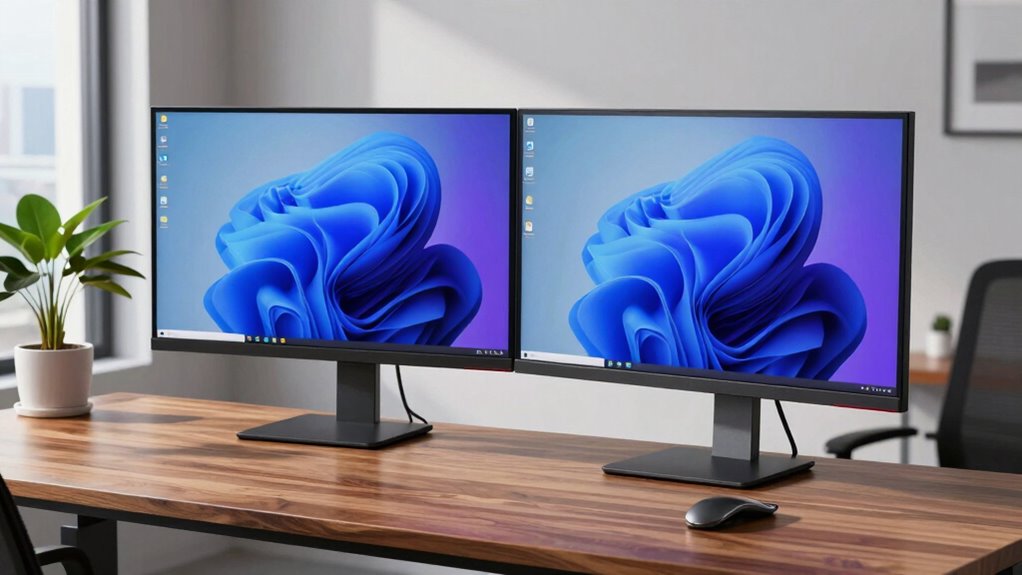

When setting up dual monitors on a standing desk, guarantee both screens are at eye level and placed at an arm’s length for comfort, with the primary monitor directly in front. Adjust their height and angle using stands or arms to prevent neck strain and keep your shoulders relaxed. Proper alignment helps minimize eye movement and body twisting, boosting productivity. For more tips on achieving an ergonomic setup that supports your long-term health, keep exploring these guidelines.
Key Takeaways
- Ensure monitors are at eye level to prevent neck strain and promote relaxed posture.
- Position primary monitor directly in front, with secondary monitor angled inward in a gentle arc.
- Use adjustable stands or arms to customize height, tilt, and alignment for ergonomic comfort.
- Adjust standing desk height so elbows are close to 90 degrees, maintaining proper wrist and shoulder alignment.
- Regularly revisit and fine-tune monitor placement to sustain optimal ergonomics and reduce fatigue.

Setting up dual monitors on a standing desk can considerably boost your productivity and comfort throughout the workday. But before you start fiddling with your screens, it’s essential to focus on ergonomic positioning and monitor alignment. Proper setup isn’t just about having two screens; it’s about arranging them so they support your body and workflow, reducing strain and fatigue. When positioning your monitors, aim for ergonomic positioning to ensure your neck, shoulders, and eyes stay relaxed. Your monitors should be at eye level, so you don’t have to tilt your head up or down. This means adjusting the height of your monitors or using stands that bring them to the right level. The goal is to keep your head in a neutral position, avoiding awkward angles that could cause discomfort over time.
Position monitors at eye level to maintain relaxed neck, shoulders, and eyes for optimal comfort.
Monitor alignment plays a crucial role in maintaining comfort and efficiency. You want your screens to be close enough that you don’t have to turn your head or move your eyes excessively between them. The ideal setup places the primary monitor directly in front of you, with the secondary monitor angled slightly inward, forming a gentle arc. This arrangement minimizes neck twisting and eye movement, allowing you to shift focus smoothly between screens. Keep the top edges of both monitors at or just below eye level, and ensure they’re at a comfortable distance—about an arm’s length away. This helps prevent eye strain and keeps your posture aligned. Additionally, choosing monitors with adjustable stands or arms can help you customize the setup for optimal monitor alignment.
When adjusting your dual monitors, pay attention to the monitor alignment to prevent uneven strain. If one monitor is significantly higher or lower than the other, you might develop neck or shoulder discomfort. Use monitor arms or adjustable stands that allow you to fine-tune height and angle, ensuring both screens are aligned horizontally and vertically. Remember, consistency is key; the more symmetrical your setup, the less your body has to compensate, reducing fatigue over long periods. Incorporating cable management solutions can also keep your workspace organized and prevent accidental disruptions to your setup. Furthermore, considering the ergonomics of your entire workspace can lead to better long-term comfort and health. Being mindful of ergonomic principles ensures your setup promotes a healthy posture and minimizes discomfort during extended work sessions. Regularly adjusting your setup based on ergonomic recommendations can further help prevent strain and support sustained comfort. Finally, don’t forget to adjust your standing desk height so your elbows remain close to a 90-degree angle when typing. Your wrists should be straight, and your shoulders relaxed. Incorporating these ergonomic principles and proper monitor alignment from the start will help you create a workspace that promotes comfort and productivity. A well-thought-out dual monitor setup on a standing desk isn’t just about more screen space; it’s about supporting your body’s natural posture and keeping you focused without discomfort.

HUANUO FlowLift™ Dual Monitor Stand, Fully Adjustable Gaming Monitor Desk Mount for 13–32″ Computer Screens, Full Motion VESA 75×75/100×100 with C-Clamp & Grommet Base, Each Arm Holds 4.4 to 19.8 lbs
Compatible with Wide Screens – To ensure compatibility with the dual monitor mount, your each monitor must meet…
As an affiliate, we earn on qualifying purchases.
As an affiliate, we earn on qualifying purchases.
Frequently Asked Questions
How Do I Prevent Neck Strain With Dual Monitors?
To prevent neck strain with dual monitors, focus on proper monitor placement and neck posture. Position both screens at eye level, centered in front of you, to avoid excessive turning or tilting. Keep a comfortable distance, about an arm’s length away. Regularly adjust your standing desk height to maintain a neutral neck position. Taking frequent breaks and stretching also helps reduce tension and keeps your neck relaxed during long work sessions.
What Is the Ideal Distance Between Monitors?
The ideal distance between monitors should be about an arm’s length, roughly 20-30 inches, to reduce eye strain. Make sure your monitors are aligned so the top of the screens are at or slightly below eye level, promoting proper monitor alignment and comfortable screen height. This setup minimizes neck strain and keeps your focus natural, preventing awkward postures. Adjust the distance and height until both screens feel comfortable and easy to view without turning your head.
Can Dual Monitors Improve Productivity on a Standing Desk?
Yes, dual monitors can improve your productivity on a standing desk when you optimize monitor placement and ergonomic height. Properly arranged monitors reduce neck and eye strain, allowing you to switch between tasks seamlessly. Keep both screens at eye level and within a comfortable viewing distance. When you adjust the ergonomic height, you’ll find it easier to maintain good posture, work longer, and stay focused throughout the day.
How Do I Manage Cable Clutter Effectively?
You might think cable clutter is inevitable, but proper cable management can make a big difference. Use cable clips and sleeves to organize and route cables neatly along your desk or monitor arms, reducing clutter and preventing tangles. Velcro straps also make it easy to bundle excess cords. Regularly check and adjust your cable setup, ensuring everything stays tidy and accessible, so your workspace remains efficient and stress-free.
What Are the Best Ergonomic Accessories for Dual Monitors?
The best ergonomic accessories for dual monitors include adjustable monitor arms that let you set each screen’s height and position at eye level. This reduces neck strain and improves comfort. Choose arms with smooth adjustments so you can easily align monitors for ideal viewing. Ensuring your monitors are at eye level helps maintain good posture, preventing fatigue during long work sessions. These accessories make your workspace more comfortable and efficient.

HUANUO FlowLift™ Single Monitor Mount, 13 to 32 Inch Monitor Arm, Adjustable Monitor Stand, Vesa Mount with Clamp and Grommet Base – Fits 4.4 to 19.8lbs LCD Computer Monitors
Great Adaptability: This HUANUO single monitor arm fits 13-32 inch monitors, holds 4.4-19.8 lbs, suitable for VESA patterns…
As an affiliate, we earn on qualifying purchases.
As an affiliate, we earn on qualifying purchases.
Conclusion
Now that you’ve got the scoop on setting up dual monitors at your standing desk, remember that your workspace is like a garden—you need to tend to it carefully for everything to flourish. With the right adjustments, you’ll find your workflow flowing smoothly, making work feel less like a mountain to climb and more like a walk in the park. So go ahead, fine-tune your setup, and enjoy a balanced, comfortable workspace that keeps you productive and pain-free!

HUANUO Dual Monitor Stand for 13″–40″, Premium Dual Monitor Mount with USB, Height Adjustable Monitor Stand for 2 Monitors, VESA Mount with Clamp/Grommet Base, Holds 26.4lbs per Arm, HNDS7
Improved Stability for Ultrawide Monitors: The upgraded dual monitor stand combines solid aluminum arms, a larger base, and…
As an affiliate, we earn on qualifying purchases.
As an affiliate, we earn on qualifying purchases.

EVEO Cable Management Under Desk Kit (6 Units) – Under Desk Cable Management Cord Hider, Cable Hider Cord Management, Cable Organizer, Cable Raceway | Self-Adhesive 96'' J Channel 6X16 – Black
Transform Your Workspace with EVEO Cable Management: Sleek cable raceway ensures perfect under desk cable management, creating a…
As an affiliate, we earn on qualifying purchases.
As an affiliate, we earn on qualifying purchases.