
The best keypad phones for seniors balance easy dialing with the right kind of connection: a landline for a fixed home phone, or cellular service for calls on the go. My best overall pick is the artfone A400 4G LTE, which combines large buttons with mobile calling; the Artfone C1+4G stands out for its charging dock and SOS button, while the AT&T CL2940 is a strong home-phone choice with a speakerphone and tilt display. The main tradeoff is between simple corded operation and the flexibility of a cellular handset, which also brings service, charging, and compatibility questions. Button size, sound, screen readability, and setup needs can matter more than extra features. Read on for the full breakdown and guidance on matching a phone to its owner.

Get the latest gadgets delivered free with Prime
- Fast, free delivery on millions of items
- Prime Video, Amazon Music and more included
- Member-only deals all year
Complete the kit



Key Takeaways
- The best overall pick is a cellular handset: the artfone A400 pairs large buttons with 4G LTE, making it more suitable for mobile use than the corded landline options.
- The Artfone C1+4G prioritizes daily ease: its charging dock, voice time, speed dial, and SOS button address different usability needs than a basic corded phone.
- Home-phone picks solve different problems: the VTech SN1117 adds senior-focused calling aids, while the AT&T CL2940 offers a speakerphone and tilt display.
- Not every phone in this roundup is a keypad phone: the Lively Jitterbug Smart5 is a smartphone, so it fits best when an older adult wants a touchscreen and more app-style functions.
- Carrier fit can outweigh the feature list: cellular models need a compatible network and service plan, while corded models depend on a working landline connection.
| VTech SN1117 Corded Senior Phone |  | Best Overall Landline Pick | Power source: Corded landline | Speed dial: Eight photo speed-dial buttons | Dialer: Single keypad | VIEW LATEST PRICE | See Our Full Breakdown |
| artfone A400 4G LTE Big Button Cell Phone for Seniors, Silver |  | Best for Feature-Phone Flexibility | Model: A400 | Network: 2G/3G/4G LTE | Carrier compatibility: T-Mobile and compatible virtual operators; not compatible with Verizon, Boost, PagePlus, or AT&T | VIEW LATEST PRICE | See Our Full Breakdown |
| AT&T Trimline Corded Phone – White (Model 213) |  | Best Wall-Mountable Pick | Power source: Corded; powered by the phone line | Speed dial: 10 numbers | Keypad: Extra-large illuminated buttons | VIEW LATEST PRICE | See Our Full Breakdown |
| Artfone C1+4G Senior Cell Phone with Large Buttons, SOS Button, Charging Dock, Voice Time, Speed Dial, Hands-Free, Large Font, Loud Speaker, FM Radio, 1800mAh Battery – Black |  | Best for Simple Mobile Calling | Network compatibility: 2G/3G/4G LTE; T-Mobile and compatible virtual operators, not CDMA | Display: 1.8-inch LCD | Buttons: 21 backlit raised buttons | VIEW LATEST PRICE | See Our Full Breakdown |
| Lively Jitterbug Smart5 Smartphone for Seniors |  | Best for Seniors Ready for a Smartphone | Operating system: Android 16 / 17 | Display: 6.75-inch IPS touchscreen, 1600 × 720 resolution, 90Hz | Cellular technology: 5G | VIEW LATEST PRICE | See Our Full Breakdown |
| Uvital Big Button Phone for Seniors, Corded Landline Phone-Speakerphone |  | Best for Photo Shortcuts and Emergency Dialing | Power source: Corded; connects directly to a telephone line | Keypad: Single keypad with eight oversized buttons | Dialing shortcuts: Customizable photo shortcuts and SOS button | VIEW LATEST PRICE | See Our Full Breakdown |
| AT&T Trimline 213-11 Corded Phone with Large Buttons and Visual Ringer |  | Best for Simple, Wall-Mounted Use | Phone type: Corded landline | Power source: Telephone line | Keypad: Large, lighted single keypad | VIEW LATEST PRICE | See Our Full Breakdown |
| 4G Flip Phone Unlocked – Dual-Screen KaiOS Phone with Large Buttons, Loud Volume, Durable Battery, Speed Dial, Camera & Bluetooth (Black) | 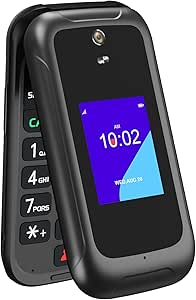 | Best Cellular Option with Physical Keys | Network and SIM: Unlocked 4G VoLTE; single nano SIM | Operating system: KaiOS | Displays: 3.2-inch main display and 2.0-inch external display | VIEW LATEST PRICE | See Our Full Breakdown |
| AT&T CL2940 Corded Phone with Speakerphone, Large Buttons and Tilt Display |  | Best for Caller ID and Hands-Free Calls | Phone type: Corded, single-line phone | Keypads: Dual keypad | Display: Tiltable display | VIEW LATEST PRICE | See Our Full Breakdown |
More Details on Our Top Picks
VTech SN1117 Corded Senior Phone
For seniors who want a simple home phone rather than a mobile device, the VTech SN1117 offers the strongest mix of easy dialing and accessible call alerts here. Its eight photo speed-dial buttons let users call familiar people by matching a picture instead of recalling a number, while spoken digit announcements can help confirm key presses. The flashing visual ringer and full-duplex speakerphone add useful support for people who may miss an ordinary ring or prefer hands-free conversation. Compared with the AT&T Trimline 213, the VTech is bulkier and less suited to wall mounting, but adds photo dialing and talking digits. Its main limitation is the cord: it needs a landline and keeps the user near the phone, even though line power can keep it working during many outages.
Pros:- Eight photo speed-dial buttons make calling familiar contacts easier.
- Large high-contrast keys and spoken digit announcements support users with low vision.
- Flashing visual ringer gives an additional alert for incoming calls.
- Full-duplex speakerphone supports hands-free conversation.
Cons:- Requires a landline and cannot be carried around the home like a mobile phone.
- Single-line operation does not suit homes needing multiple phone lines.
- Larger tabletop footprint is less convenient than the wall-mountable AT&T Trimline 213.
Best for: Seniors who use a home landline and want photo-based one-touch calling, spoken dialing feedback, and hands-free conversations.
Not ideal for: People who need a portable phone, rely on mobile service, or want a wall-mounted unit with a smaller footprint.
- Power source:Corded landline
- Speed dial:Eight photo speed-dial buttons
- Dialer:Single keypad
- Call alerts:Flashing visual ringer and spoken digit announcements
- Speakerphone:Full-duplex
- Line operation:Single-line
- Dimensions:7.47 × 8.23 × 4.11 inches
Our verdict“Choose the VTech SN1117 if photo speed dialing and spoken keypad feedback matter more than portability or wall mounting.”
artfone A400 4G LTE Big Button Cell Phone for Seniors, Silver
The artfone A400 is the more capable mobile choice for seniors who want calls and texts without smartphone browsing. Its raised backlit keypad, large fonts, hearing enhancement mode, and charging dock address everyday usability, while the SOS button can call up to five preset numbers and send a distress text. That makes it more suitable for someone who leaves home than the corded VTech SN1117, which depends on a landline and stays in one place. The A400 also offers Bluetooth, FM radio, and a camera, but its 2.4-inch screen is still small and it does not support internet browsing. The biggest hurdle is carrier fit: it is listed for T-Mobile and compatible virtual operators, not AT&T, Verizon, or Boost. I would confirm service compatibility before choosing it.
Pros:- Raised, backlit keys and large fonts make dialing easier in dim light.
- SOS button can call up to five preset numbers and send a distress SMS.
- Charging dock reduces the need to handle a small charging connector.
- Hearing enhancement mode, Bluetooth, and speed dial add practical accessibility and convenience.
Cons:- Does not support internet browsing or smartphone apps.
- Carrier support is limited; compatibility should be checked before purchase.
- Small 2.4-inch display is less suited to reading lengthy messages.
Best for: Seniors who want a basic mobile phone for calls and texts, a physical keypad, an SOS feature, and confirmed T-Mobile-compatible service.
Not ideal for: People who need smartphone apps or web access, or whose carrier is AT&T, Verizon, Boost, or another unsupported network.
- Model:A400
- Network:2G/3G/4G LTE
- Carrier compatibility:T-Mobile and compatible virtual operators; not compatible with Verizon, Boost, PagePlus, or AT&T
- Display:2.4-inch LCD
- Camera:2MP
- Battery:1800mAh; 8–10 hours talk time
- Charging:Charging dock
- Contacts:Up to 1000
- Accessibility and calling features:SOS, speed dial, hearing enhancement mode, raised backlit keypad
Our verdict“Pick the A400 for mobile calls, texts, and emergency shortcuts only if its limited carrier compatibility matches your service.”
AT&T Trimline Corded Phone – White (Model 213)
The AT&T Trimline 213 suits a senior who wants a straightforward landline phone that can hang on a wall instead of taking up a table. Its extra-large illuminated buttons are easier to find in low light, and the visual ringer offers a call alert without relying on sound alone. Since it runs on line power rather than an AC adapter or batteries, it can remain available during a household power outage when the landline service is functioning. Compared with the VTech SN1117, it is lighter, smaller, and wall-mountable, but gives up photo speed-dial keys, spoken digit announcements, and the VTech’s full-duplex speakerphone. Its 10-number speed dial is useful, though calling still requires remembering or labeling the stored contacts. The corded handset also limits movement around the home.
Pros:- Large illuminated buttons are easier to locate in low light.
- Visual ringer provides a call alert for people who may not hear the phone.
- Wall-mountable body saves counter space.
- Line-powered operation does not require AC power or batteries.
Cons:- Corded handset restricts movement during calls.
- Speed dial stores numbers but does not offer the VTech SN1117’s photo buttons or spoken digit feedback.
- Single-line design does not support multiple phone lines.
Best for: Seniors who want a compact, wall-mounted landline with large illuminated buttons and visual call alerts.
Not ideal for: People who need cordless mobility, photo-based contact shortcuts, or spoken confirmation while dialing.
- Power source:Corded; powered by the phone line
- Speed dial:10 numbers
- Keypad:Extra-large illuminated buttons
- Call alert:Visual ringer
- Hearing aid compatibility:HAC and T-coil rated
- Mounting:Wall-mountable
- Line operation:Single-line
- Dimensions:3 × 8.5 × 3.5 inches
- Weight:8 ounces
Our verdict“Choose the Trimline 213 if a simple, wall-mounted landline matters more than photo dialing or hands-free features.”
The Artfone C1+4G keeps mobile phone use focused on calls, texts, and basic utilities, with 21 raised backlit buttons and a voice time announcement that can reduce the need to read the screen. Its SOS button, loud speaker, and charging dock give it a practical senior-oriented feature set without the extra functions of a smartphone. Compared with the artfone A400, it has a smaller 1.8-inch display and a more explicitly tactile 21-button layout; the A400 offers a larger 2.4-inch screen and hearing enhancement mode. Both are limited to T-Mobile-compatible service and omit web browsing, so neither is a fit for users who want apps. The C1+4G’s 7–8 hours of stated talk time and optional dock are convenient, but buyers should check network support and be comfortable with its compact screen.
Pros:- Raised, backlit buttons and large font support easier dialing and screen reading.
- Voice time announcement offers a way to check the time without reading the display.
- SOS button and loud speaker add useful safety and call-access features.
- USB-C charging and an optional dock provide flexible charging choices.
Cons:- No internet browsing or smartphone apps.
- Carrier support is limited to T-Mobile-compatible networks and excludes CDMA service.
- The 1.8-inch screen is smaller than the A400’s display and can make text less comfortable to read.
Best for: Seniors who want a basic mobile phone with tactile keys, voice time announcements, SOS dialing, and a charging dock.
Not ideal for: People who need internet access, smartphone apps, a larger display, or service on an unsupported carrier such as Verizon.
- Network compatibility:2G/3G/4G LTE; T-Mobile and compatible virtual operators, not CDMA
- Display:1.8-inch LCD
- Buttons:21 backlit raised buttons
- Battery:1800mAh; 7–8 hours talk time
- Contacts:Up to 1000
- Charging:USB-C with optional charging dock
- Safety and accessibility features:SOS button, voice time announcement, large font, loud speaker
- Connectivity:Bluetooth and FM radio
Our verdict“Choose the C1+4G for tactile, basic mobile calling and voice prompts if you accept its small screen and carrier restrictions.”
Lively Jitterbug Smart5 Smartphone for Seniors
The Lively Jitterbug Smart5 is the clear outlier in a keypad-phone roundup: it replaces physical buttons with a 6.75-inch touchscreen and an easy-to-navigate menu. I include it for seniors who want a larger screen, real-time call captioning, smartphone features, and an Urgent Response button rather than a traditional keypad. Those needs set it apart from the Artfone C1+4G, whose raised physical keys and basic call-and-text approach are better for people who find touchscreens difficult. The Smart5 also offers a high-resolution camera and setup assistance from Lively, but its service restriction is substantial: it only works with an activated Lively phone plan. A touchscreen may be a poor match for users who depend on tactile keys, and buyers should choose this only if they are comfortable with Lively service.
Pros:- Large 6.75-inch display gives text and menus more room than the small-screen Artfone keypad phones.
- Real-time call captioning can make conversations easier to follow.
- Urgent Response button and Lively setup assistance provide dedicated support options.
- 5G connectivity and 128GB of storage support smartphone use beyond basic calls and texts.
Cons:- Does not have a physical keypad, so it is a mismatch for buyers who need tactile buttons.
- Requires an activated Lively phone plan and does not support other carriers.
- Touchscreen menus may be harder to operate for users who prefer simple, direct keypad dialing.
Best for: Seniors who want a large-screen smartphone, call captioning, an Urgent Response button, and support from Lively.
Not ideal for: People specifically seeking physical keypad buttons, those uncomfortable with touchscreen navigation, or anyone who wants to use another carrier.
- Operating system:Android 16 / 17
- Display:6.75-inch IPS touchscreen, 1600 × 720 resolution, 90Hz
- Cellular technology:5G
- Carrier compatibility:Lively phone service only
- Memory and storage:8GB RAM, 128GB storage; expandable up to 2TB
- Rear cameras:50MP main and 5MP ultra-wide
- Battery:5010mAh
- Weight:6.88 ounces
- Accessibility features:Real-time call captioning and Urgent Response button
Our verdict“Choose the Smart5 only if a large touchscreen and Lively’s support features matter more than having physical keypad buttons.”
Uvital Big Button Phone for Seniors, Corded Landline Phone-Speakerphone
I’d put the Uvital first for seniors who find names easier to recognize than numbers: its eight oversized buttons can be set up with photo shortcuts, and a dedicated SOS button reduces the steps needed to call for help. The adjustable ringer, listed up to 120 dB, and flashing LED provide both sound and visual alerts, while speakerphone can help someone who has difficulty holding a handset. Compared with the AT&T CL2940, the Uvital favors simple, direct dialing over caller ID and a display; unlike the AT&T Trimline 213-11, it does not offer a stated 10-number speed-dial list. That focus is also its limit: it is a basic, single-line landline with no screen, caller ID, voicemail, or internet service, and wall mounting is not recommended.
Pros:- Eight oversized buttons with customizable photo shortcuts make saved contacts easier to identify.
- Dedicated SOS button offers a direct emergency-dialing option.
- Adjustable ringer listed up to 120 dB and a flashing LED alert provide sound and visual call notifications.
- Speakerphone supports hands-free conversations, and the phone connects to an RJ11 line without batteries or external power.
Cons:- No display, caller ID, voicemail, or internet features.
- Wall mounting is not recommended.
- Single-line corded operation limits where and how the phone can be used.
Best for: Seniors who benefit from photo-based dialing, a prominent emergency shortcut, and loud or visual incoming-call alerts.
Not ideal for: People who need caller ID, a display, voicemail, wall mounting, or a mobile phone they can carry around the home.
- Power source:Corded; connects directly to a telephone line
- Keypad:Single keypad with eight oversized buttons
- Dialing shortcuts:Customizable photo shortcuts and SOS button
- Ringer:Adjustable volume up to 120 dB
- Call alerts:Flashing LED
- Calling features:Hands-free calling
- Line operation:Single-line
- Compatible service:PSTN
Our verdict“Choose the Uvital if photo shortcuts, an SOS button, and conspicuous alerts matter more than caller ID or a screen.”
I rank the AT&T Trimline 213-11 as the straightforward choice for someone who wants a familiar landline with larger controls and few setup demands. It draws power from the telephone line, so there is no separate adapter, outlet, or battery requirement, and its lighted keypad helps with dialing in dim rooms. The flashing visual ringer is useful when an incoming call is hard to hear, while hearing-aid compatibility and a wall-mount option make it more adaptable than the Uvital, which is not recommended for wall mounting. Its 10-number speed dial adds convenient shortcuts, though it lacks the Uvital’s photo buttons and SOS key. This is still a basic single-line phone: calls remain tethered to the handset, and there is no stated display or caller ID to help identify who is calling.
Pros:- Large buttons and a lighted keypad support dialing in low light.
- Telephone-line power avoids the need for batteries, an AC adapter, or a wall outlet.
- Flashing visual ringer can signal incoming calls even when the ringer is turned off.
- Stores up to 10 speed-dial numbers and supports standard wall mounting.
Cons:- Corded handset restricts movement during calls.
- Single-line operation offers no support for multiple telephone lines.
- No stated display or caller ID for checking incoming callers.
Best for: Seniors seeking a no-frills corded phone for a wall location, with larger illuminated keys and hearing-aid compatibility.
Not ideal for: People who need a speakerphone, photo dialing, an SOS shortcut, caller ID, or freedom to move during calls.
- Phone type:Corded landline
- Power source:Telephone line
- Keypad:Large, lighted single keypad
- Speed dial:Up to 10 numbers
- Ringer alert:Flashing visual ringer
- Hearing aid compatibility:HAC and T-coil rated
- Mounting:Wall mountable
- Line operation:Single-line
- Dimensions and weight:3 x 8.5 x 3.5 inches; 0.48 kg
Our verdict“Pick the Trimline 213-11 for simple wall-mounted dialing and visual alerts, but choose the Uvital for photo shortcuts or the CL2940 for a display and speakerphone.”
4G Flip Phone Unlocked – Dual-Screen KaiOS Phone with Large Buttons, Loud Volume, Durable Battery, Speed Dial, Camera & Bluetooth (Black)
Among these picks, the VAHVARNA Oasis M1 is the one to choose when a senior needs a portable cellular phone rather than a landline. Its large, backlit physical keys and flip design retain tactile dialing, while the external screen can show information without opening the phone. Unlike the AT&T Trimline 213-11 and CL2940, it can travel beyond the home and supports 4G VoLTE; KaiOS also adds tools such as Google Search, YouTube, GPS, and Maps. That extra capability brings more to learn than a basic corded phone, and its 1 GB of RAM and 8 GB of internal storage are modest, so app use and storage may feel constrained. The removable battery offers up to 10 hours of talk time, but this model has no stated water resistance and takes a single nano SIM.
Pros:- Large backlit physical buttons support dialing in low light and with reduced dexterity.
- Dual displays provide a main screen and an external screen for at-a-glance information.
- Removable 2,000 mAh battery is listed for up to 10 hours of talk time and 120 hours of standby.
- 4G VoLTE, Wi-Fi, GPS, Bluetooth, and KaiOS add mobile and connected features absent from the corded options.
Cons:- KaiOS apps and connected features add complexity compared with a basic landline phone.
- 8 GB of internal storage is limited; microSD card expansion is available but the card is not included.
- No water resistance is specified, and the 5 MP front camera is low resolution.
Best for: Seniors who want a portable 4G phone with tactile buttons, a flip cover, and access to basic apps and navigation.
Not ideal for: People who want the simplest possible phone, a landline with no charging routine, or ample storage for apps and media.
- Network and SIM:Unlocked 4G VoLTE; single nano SIM
- Operating system:KaiOS
- Displays:3.2-inch main display and 2.0-inch external display
- Battery:Removable 2,000 mAh
- Talk and standby time:Up to 10 hours talk time; up to 120 hours standby
- Memory and storage:1 GB RAM; 8 GB internal storage; microSD expansion up to 32 GB
- Connectivity:Wi-Fi 2.4 GHz; Bluetooth 4.2; GPS
- Ports:USB Type-C and 3.5 mm headset jack
- Dimensions and weight:120 x 63 x 20 mm; 160 g
Our verdict“Choose the Oasis M1 if portability and 4G matter more than the simpler operation of the Uvital or AT&T corded phones.”
The AT&T CL2940 earns its place for seniors who want more information and control than a bare-bones landline provides. Its tiltable display and caller ID history can make it easier to check who called, while the speakerphone supports hands-free conversations and Audio Assist boosts listening volume. Compared with the AT&T Trimline 213-11, it trades a simpler wall-phone layout for caller ID, a display, and speakerphone; compared with the Uvital, it stores caller details rather than relying on photo shortcuts and an SOS button. The tradeoff is that the display and caller ID require four AA batteries, which are not included, even though the phone itself is corded. It is also single-line, so its added features do not make it a substitute for a multi-line system.
Pros:- Extra-large buttons and a tiltable display help with dialing and viewing call information.
- Speakerphone allows hands-free conversations.
- Audio Assist and an adjustable extra-loud ringer offer added listening support.
- Caller ID and Call Waiting store up to 50 names and numbers; phone can sit on a desk or be wall-mounted.
Cons:- Caller ID and display functions require four AA batteries, which are not included.
- Corded operation limits mobility during calls.
- Single-line operation does not support multiple telephone lines.
Best for: Seniors who want a corded home phone with caller ID history, a viewable display, hands-free calling, and a listening-volume boost.
Not ideal for: People who want a phone with no battery-dependent features to set up, or who need a portable or multi-line phone.
- Phone type:Corded, single-line phone
- Keypads:Dual keypad
- Display:Tiltable display
- Caller ID history:Up to 50 names and numbers
- Battery requirement:Four AA batteries for caller ID and display functions; not included
- Calling features:Speakerphone and Audio Assist volume boost
- Mounting:Desktop or wall-mountable
- Dimensions and weight:7.9 x 8.8 x 3.7 inches; 16 ounces
Our verdict“Choose the CL2940 if caller details and hands-free calling matter more than the Trimline’s simpler setup or the Uvital’s photo and SOS shortcuts.”
How We Picked
I ranked these nine options by how well their controls and calling setup suit older adults, not by how many features they list. I focused on button legibility and ease of dialing, sound and hands-free calling, screen readability, charging or power routine, and the type of connection each phone needs. A dock, speed dial, visual alert, or SOS button can make a real difference for a particular person, but those features do not replace basic usability or a reliable connection.
The order reflects how broadly useful each phone appears for the intended buyer. The artfone A400 leads for its combination of large-button cellular use, while the Artfone C1+4G earns a close role for added assistance features. Home-phone models follow according to their calling aids and ease of placement; the compact AT&T Trimline options suit simpler needs but provide fewer senior-focused conveniences. The Lively Jitterbug Smart5 and unlocked flip phone are included for readers who want a different form of mobile access, with their added complexity and compatibility checks factored into their fit.
Factors to Consider When Choosing Best Keypad Phones For Seniors
Before choosing from the list, I would match the phone to the person’s routine rather than starting with the longest feature list. These decisions can prevent a common mismatch: buying a capable phone that is difficult to hear, charge, or connect.
Choose the connection before the handset
Decide whether the phone needs to stay in one room or travel with its owner. A corded landline avoids a mobile plan and routine battery charging, but it only helps where a compatible landline connection is available. A cellular phone allows calls away from home, though it requires a working network, service, and a charging habit. Do not assume that an unlocked phone will work with every carrier; check the exact model’s supported bands and the carrier’s activation rules. If the phone is for emergency use, confirm whether the planned connection remains available during a power outage or network disruption.
Test usability in the conditions that matter
Large buttons are useful only if their labels are easy to distinguish and the spacing helps prevent accidental presses. Consider whether the owner has reduced vision, shaky hands, or difficulty reading a screen, and look for controls that can be operated without menus. A loud ringer and a clear speaker can matter more than a large number of ringtones or media features. If possible, check sound and display settings in the environment where the phone will be used, since room noise and lighting change what feels readable. Avoid choosing by the phrase “big button” alone; it says little about contrast, menu complexity, or how easy it is to answer and end a call.
Match safety features to the person’s routine
An SOS button can provide a quick way to start a call, but it is not a substitute for a monitored medical-alert service. Find out what the button actually does, whether it calls a chosen contact or emergency number, and whether setup or a service subscription is needed. Speed dial is often more practical for someone who regularly calls the same few people. A visual ringer or flashing alert may help an owner who does not reliably hear a ringtone, while a speakerphone can reduce the need to hold a handset. Choose only aids the owner can recognize and use confidently, and make sure contacts know what to expect if an alert is triggered.
Plan for charging, power, and placement
A mobile phone offers freedom from a fixed spot, but it also needs a reliable charging routine. A dock may be easier to use than a small cable connector, especially if the owner has limited dexterity or tends to misplace accessories. Ask where the phone will live overnight and whether that location has a reachable outlet. Corded phones avoid handset charging, although some models may need batteries or power for certain functions; check the manufacturer’s requirements rather than assuming every feature works without power. Keep the handset and its controls in a consistent, accessible place so the phone is easy to find when it rings.
Pay for useful simplicity, not feature count
A higher-feature phone makes sense when the owner will use its specific advantages, such as a dock, SOS shortcut, clear display, or mobile connectivity. Extra cameras, radio functions, Bluetooth, or smartphone apps can add setup steps without improving everyday calling for someone who wants a simple handset. The reverse is also true: a basic corded phone may be a poor fit if the owner needs to make calls outside the home. Ask the intended user to try the main tasks—answering, placing a call, adjusting volume, and reaching saved contacts—before settling on a model. A phone that handles those few tasks simply is often a better match than one with a longer feature list.
Check whether the form factor fits the user
“Keypad phone” can refer to a corded home phone, a basic cellular handset, or a flip phone; these are not interchangeable choices. A touchscreen smartphone like the Lively Jitterbug Smart5 may suit someone who wants apps and a familiar smartphone-style interface, but it is not the straightforward physical-keypad option some buyers expect. Flip phones can protect the screen and keep controls compact, while their smaller displays or menus may be harder for some users. Think about how the person already communicates and whether they are willing to learn a different layout. Matching the device to their habits can matter more than adding a particular feature.
Frequently Asked Questions
Should I buy a corded phone or a cellular keypad phone for a senior?
Choose a corded phone if calls happen mainly at home and a compatible landline connection is available. It avoids a mobile service plan and a handset charging routine, but it cannot travel with the user. A cellular keypad phone suits someone who needs to call away from home or does not have a landline, though carrier compatibility and service availability must be checked first. Some households keep both: a simple home phone and a mobile handset for outings. Let the owner’s daily routine and ability to maintain a charge guide the choice.
Is an SOS button enough to make a phone suitable for emergencies?
No. An SOS button can make it quicker to call a saved contact, but its behavior varies by model and may depend on setup, network access, and an active mobile plan. Confirm who receives the call and whether the feature can reach emergency services directly before relying on it. It also does not provide automatic fall detection or monitored response unless those services are explicitly included. If the owner needs ongoing emergency monitoring, compare the phone with a dedicated medical-alert service rather than treating the button as a replacement.
Will an unlocked 4G keypad phone work with any carrier?
No. “Unlocked” generally means the phone is not restricted to one carrier, but it does not guarantee support for every network or plan. Check the exact model’s LTE bands, voice calling support, SIM requirements, and carrier approval before buying. Confirm that the carrier will activate it for voice service in the owner’s area, not just that the phone can connect to some data network. This check is especially relevant for imported or generically named flip phones, whose specifications can vary by version.
When is a senior smartphone a better choice than a physical keypad phone?
A smartphone can be a better fit when the owner already uses touchscreens or wants video calls, messaging apps, maps, and other connected services. The Lively Jitterbug Smart5 is the smartphone option in this roundup, while the Artfone and basic flip-phone choices put more emphasis on physical keys. Touchscreens can offer larger on-screen controls, but they may require more navigation and familiarity than direct-dial buttons. If the main goal is making and receiving calls with minimal steps, a physical keypad is usually the more direct starting point. Choose a smartphone only when its added functions match the person’s interests and support needs.
What should I check before giving a keypad phone to an older relative?
Set up the phone with the owner present when possible, so the button layout, ring volume, and answering method feel familiar. For a cellular model, confirm service activation, network coverage at home, and saved contacts; for a corded model, verify the line connection and any battery or power needs. Practice placing and ending a call, using speakerphone, and reaching speed dial or SOS controls. Keep written instructions in large, clear print near the phone, but avoid filling them with features the owner will not use. A short practice session can reveal usability problems that a specification list will not.
Conclusion
For a mobile handset with large buttons, I recommend the artfone A400 4G LTE as the best overall; choose the Artfone C1+4G as the best for extra assistance features if its dock, voice time, and SOS shortcut fit the owner’s routine. The best value in function is a basic corded model such as the AT&T Trimline 213-11 when the user wants straightforward home calling and does not need cellular mobility. For a home phone with more calling support, the VTech SN1117 is a strong beginner-friendly direction, while the AT&T CL2940 better suits someone who wants a speakerphone and tilt display. I would reserve the Lively Jitterbug Smart5 for a senior who wants a smartphone, and consider the unlocked flip phone only after checking carrier compatibility. The right choice comes down to where calls happen, which controls the owner can use easily, and how much setup they are willing to manage.