
📊 Full opportunity report: How to Reduce Heat and Noise in a High-Power AI Workstation on ThorstenMeyerAI.com — validation score, market gap, and execution plan.

Get the latest gadgets delivered free with Prime
- Fast, free delivery on millions of items
- Prime Video, Amazon Music and more included
- Member-only deals all year
TL;DR
High-power AI workstations generate significant heat and noise due to sustained GPU loads. Key solutions include undervolting, optimizing cooling, and improving airflow, which can significantly reduce thermal output and sound levels.
High-power AI workstations produce substantial heat and noise during sustained workloads, often turning quiet home offices into noisy server rooms. Recent expert guidance highlights effective, proven methods to reduce both, focusing on undervolting, cooling, and airflow optimization, which can improve comfort and system performance.
AI workstations handling continuous GPU loads generate more heat and noise than gaming PCs because they operate at or near full capacity for hours without breaks. The primary source of heat is the GPU, which can account for over 70% of the thermal load, and its fans are typically the loudest component during sustained use. CPU and power supply components also contribute, especially under high power draw, with VRMs and case airflow influencing overall temperature and noise levels.
One of the most effective and cost-free strategies is undervolting the GPU and capping its power limit. This reduces heat output significantly with minimal impact on inference performance, particularly since many workloads are memory-bound. Upgrading case airflow and selecting quieter cooling solutions further help manage thermal and acoustic levels. Fans, coil whine, and vibrations are all contributors to noise, each requiring targeted fixes. Proper placement of intake and exhaust fans, use of sound-dampening materials, and high-quality cooling hardware can make a noticeable difference.
Expert sources recommend starting with source reduction—undervolting and power capping—before investing in advanced cooling or noise-reduction gear. These adjustments are especially relevant for users running long inference tasks or multi-GPU setups, where thermal management challenges are most pronounced.
An AI workstation isn’t a gaming PC —
and that’s why it runs hot.
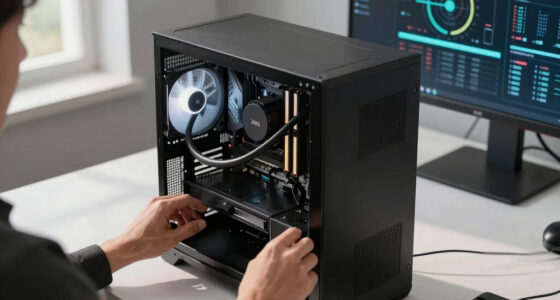
Local inference is a sustained load: the GPU sits near full power for hours with no loading screens, so the heat never dissipates and the fans never get a break. Here’s where the heat comes from — and the five levers that reduce it.
Impact of Heat and Noise Reduction on AI Workstation Use
Reducing heat and noise in high-power AI workstations enhances user comfort, prolongs hardware lifespan, and maintains system stability. Lower thermal output can prevent throttling and performance degradation, while quieter operation improves the work environment, especially for home or shared offices. These improvements can also reduce energy consumption and operational costs over time.
As an affiliate, we earn on qualifying purchases.
Background on Heat and Noise Challenges in AI Hardware
Unlike gaming PCs, AI workstations operate continuously at high loads, often for hours, which leads to sustained heat generation. The primary source of heat is the GPU, especially in multi-GPU configurations where exhaust from one card affects others. Historically, cooling solutions designed for gaming do not suffice for inference workloads, requiring specialized approaches. Recent expert guidance emphasizes the importance of source-level adjustments, airflow management, and quieter cooling options to address these challenges effectively.
“Undervolting your GPU and optimizing airflow are the most cost-effective ways to cut heat and noise in high-power AI workstations.”
— Thorsten Meyer, AI hardware expert
As an affiliate, we earn on qualifying purchases.
Remaining Questions About Long-Term Effects of Adjustments
It is still uncertain how sustained undervolting and power capping impact long-term GPU stability and lifespan. While current evidence suggests minimal risk when done correctly, comprehensive long-term studies are lacking. Additionally, the optimal cooling configurations for various case types and workloads remain an area of ongoing experimentation.
As an affiliate, we earn on qualifying purchases.
Next Steps for Improving AI Workstation Cooling and Noise Control
Users should implement source reduction techniques like undervolting and power capping first, then evaluate cooling upgrades and airflow improvements. Manufacturers and hardware vendors are expected to release more optimized cooling solutions tailored for continuous AI workloads. Future research may provide clearer guidelines on long-term impacts and best practices for balancing performance, heat, and noise.
high-performance cooling solution for AI workstation
As an affiliate, we earn on qualifying purchases.
As an affiliate, we earn on qualifying purchases.
Key Questions
What is the most effective way to reduce heat in a high-power AI workstation?
The most effective method is undervolting the GPU and capping its power limit, which reduces heat output without sacrificing inference performance.
Can I make my AI workstation quieter without sacrificing performance?
Yes, by optimizing airflow, upgrading to quieter fans, and addressing noise sources like coil whine and vibrations, you can significantly reduce noise levels while maintaining performance.
Does undervolting harm GPU longevity?
When done correctly, undervolting is generally safe and can even reduce thermal stress, potentially extending GPU lifespan. However, long-term effects are still being studied.
Are liquid coolers necessary for reducing noise in AI workstations?
Not necessarily. High-quality air coolers and good airflow management can achieve significant noise reduction; liquid coolers may offer quieter operation but are not mandatory.
What should I prioritize first: cooling upgrades or noise dampening?
Start with source-level adjustments like undervolting and power capping. Once heat is controlled, focus on airflow and noise dampening solutions.
Source: ThorstenMeyerAI.com
Fall Picks
fall essentials
As an affiliate, we earn on qualifying purchases.