

TL;DR
A buyer’s guide from Thorsten Meyer AI compares 10 4K monitors across office work, creative tasks, gaming and budget use. Its picks range from 60Hz productivity screens to a 160Hz gaming model, with price, GPU needs, connectivity and ergonomics shaping the tradeoffs.
Thorsten Meyer AI has published a guide to 10 4K monitors for office work, creative tasks, gaming and general home use, highlighting refresh rates, panel types and connectivity as the main factors separating the options. The guide names the LG 27US500-W its best overall pick for most users and points to the ASUS TUF Gaming VG27UQ1A for high refresh rate gaming, though it provides no independent test results or dated pricing.

Get the latest gadgets delivered free with Prime
- Fast, free delivery on millions of items
- Prime Video, Amazon Music and more included
- Member-only deals all year
The listed screens all have a 3840-by-2160 resolution, but their refresh rates range from 60Hz to 160Hz. The ASUS TUF VG27UQ1A is listed at 160Hz, while Dell’s 27-inch S2725QC and 32-inch S3225QS are listed at 120Hz. Several models, including the LG 27US500-W and Samsung ViewFinity S7 options, are listed at 60Hz.
The guide favors the LG 27US500-W as an all-around 27-inch IPS display, citing color consistency and a 90% DCI-P3 figure in its specifications table. It describes the Samsung 27-inch ViewFinity S7 as a productivity choice with an Eye Saver Mode, and the 32-inch ViewFinity S7 as a larger, VA-panel alternative. The source does not provide test methods for its color or comfort assessments.
For gaming and mixed use, the guide highlights the ASUS model’s stated 160Hz refresh rate and 1ms response time, as well as the Dell S2725QC’s 120Hz refresh rate and FreeSync Premium. It also lists the Dell S2725QS at 120Hz with an adjustable stand, and identifies the Sceptre U275W-UPT as an entry-level option with up to 70Hz via DisplayPort. The guide warns that its budget positioning comes with compromises in brightness and stand adjustment.
Choosing a 4K Monitor for Every Use Case
A guide compares 10 4K monitors for office work, creative tasks, gaming and home use. Refresh rate, connectivity, price and ergonomics shape the tradeoffs.
Match the screen to the work
The guide groups its picks by use case, with different strengths for everyday tasks and gaming.
LG 27US500-W
Named the best overall pick for most users, with a 27-inch IPS panel and a listed 90% DCI-P3 gamut.
ASUS TUF VG27UQ1A
Listed at 160Hz and 1ms response time; high refresh rates at 4K can demand substantial GPU power.
Dell S2725QC
Offers USB-C connectivity and a listed 120Hz refresh rate. Confirm its power delivery meets your needs.
Refresh rate is a tradeoff
A higher rate can smooth motion and scrolling, but your computer must be able to drive games at 4K.
Compare the practical details
Every listed screen is 3840 by 2160 pixels, but size, ports and stand features vary.
| Choice | Guide detail | Consider |
|---|---|---|
| 27-inch screens | Sharper text than 32-inch models | May suit text-heavy work |
| 32-inch screens | Larger display area | May need display scaling |
| Dell S2725QS | 120Hz; adjustable stand | No USB-C power delivery |
| Sceptre U275W-UPT | Up to 70Hz via DisplayPort | Brightness and stand adjustment are compromises |
Verify before you buy
Use the guide as a starting point, then check the exact configuration and current evidence.
- Confirm the model number, ports and stand adjustments.
- Check current prices and availability with retailers.
- For gaming, make sure your GPU can handle 4K at the desired refresh rate.
- Look for independent measurements of brightness, color and response time.
Refresh Rate Shapes the Choice
The comparison underscores a practical tradeoff for buyers: higher refresh rates can make motion and scrolling look smoother, but gaming at 4K and high frame rates demands more from a computer’s graphics hardware. A 60Hz screen may be a more suitable match for office work or a modest system, while a 120Hz or 160Hz model can make sense for users whose hardware and games can take advantage of it.
Screen size and connections also affect day-to-day use. The guide says 27-inch screens render text more sharply than 32-inch models at the same resolution, while larger screens may call for display scaling. Dell’s S2725QC is cited for USB-C connectivity; the S2725QS is described as lacking USB-C power delivery. Those differences can matter for laptop users and people who want to adjust a monitor’s height or orientation.
Products Worth Considering

LG 27GR83Q-B 27-inch Ultragear QHD IPS Gaming Monitor
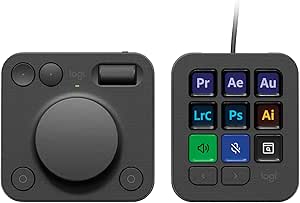
Logitech MX Creative Console with 9 Customizable Keys, Graphite

Logitech MX Master 4 Ergonomic Wireless Mouse with Haptics – Graphite
As an affiliate, we earn on qualifying purchases.
Ten Screens, Several Tradeoffs
The source groups the products by intended use rather than claiming a single best specification for every buyer. The ten entries include two LG models, two Samsung ViewFinity S7 models, three Dell options, two Sceptre listings and the ASUS gaming display. The selections cover 27-inch and 32-inch formats and IPS, VA and Fast IPS panel descriptions.
Among the stated specifications, the ASUS VG27UQ1A is listed with a 95% DCI-P3 gamut, while Dell’s S3225QS is also listed at 95% DCI-P3 and the S2725QC at 99% sRGB. The guide’s entries also flag missing built-in speakers on the ASUS and limited speaker output on the Dell S2725QC. These are product-guide claims; the supplied material does not include lab measurements, current prices or links to detailed testing.
“The LG 27US500-W stands out as the best overall 4K monitor for most users.”
— Thorsten Meyer AI guide
Testing and Prices Are Missing
The supplied guide does not show when most models were tested, how they were assessed or what prices were used. It includes an Sceptre listing labeled 2026, but does not give a publication date for the guide as a whole. Prices and availability can change, so its value judgments cannot be checked against current offers from the provided material alone.
Some product details are incomplete: the comparison table omits color-gamut figures for both Samsung ViewFinity S7 screens and the LG 32U701B-B. The source also presents two Sceptre entries for what appears to be the same U275W-UPT line. It is unclear whether they refer to different configurations or duplicate listings. Independent image-quality, brightness and response-time results are not included.
Check the Exact Configuration
Before buying, readers should compare the exact model number and current manufacturer specifications with the guide’s listed resolution, refresh rate, ports and stand adjustments. Laptop users should confirm whether USB-C supports the power delivery they need; gamers should check that their graphics hardware can drive their chosen games at 4K and the monitor’s higher refresh rates.
The next useful step would be to consult current retailer listings and independent reviews for measured brightness, color performance, warranty terms and price. The source material does not announce a follow-up test or provide a date for updated recommendations.
Key Questions
Which monitor does the guide recommend for most users?
It names the LG 27US500-W as its overall pick, citing its 27-inch IPS panel and color specifications. The supplied material does not include independent test results or current pricing.
Which listed monitor has the highest refresh rate?
The ASUS TUF Gaming VG27UQ1A is listed at 160Hz, the highest rate among the ten entries. The guide says using high refresh rates at 4K can require substantial graphics processing power.
Are all ten monitors 4K?
Yes. The source lists each model at 3840 by 2160 pixels. Their panel types, screen sizes, refresh rates and connectivity vary.
What is not established by the guide?
The supplied material does not establish current prices, availability, or comparative lab performance. It also does not explain its testing method or clarify whether the two Sceptre entries represent distinct configurations.
Source: Thorsten Meyer AI