
TL;DR
Samsung DeX is a desktop interface available on many Galaxy phones, letting users run apps on a connected monitor and work with a larger display. XDA Developers’ Nov. 15 report argues that the feature is more capable than many owners may expect, though its usefulness depends on app support and a few accessories.
Samsung DeX can turn a supported Galaxy phone into a desktop-style workspace when connected to a monitor, but many Galaxy owners may never use it, according to a Nov. 15 report from XDA Developers. The feature offers a larger-screen interface for apps and multitasking, presenting an alternative for short work sessions or basic home computing without buying a separate computer.

Get the latest gadgets delivered free with Prime
- Fast, free delivery on millions of items
- Prime Video, Amazon Music and more included
- Member-only deals all year
DeX debuted with the Galaxy S8 series and is available on many Samsung phones released since then, according to XDA. When started on an external display, it arranges familiar phone functions in a desktop layout, with an app launcher and search, navigation controls, notifications and quick settings. The interface also supports windowed and full-screen app use, though the experience varies by app.
XDA’s author reports that apps including Chrome, Gmail and Google Docs make useful use of a larger screen. Gmail can show a message list alongside a reply or compose window, while Docs can serve for drafting and notes. The article also says some collaboration and Microsoft Office apps work well in DeX. These are the author’s observations, not a guarantee that every app or regional service will behave the same way.
For a wired monitor setup, the article describes using a USB-C-to-HDMI hub, with additional connections for power and peripherals. The author says a hub they bought cost $10; that is an individual example, not a general price guarantee. DeX can also work wirelessly. A keyboard and mouse can make the wired setup more practical, while a hub’s USB-C Power Delivery pass-through can keep the phone powered during longer sessions.
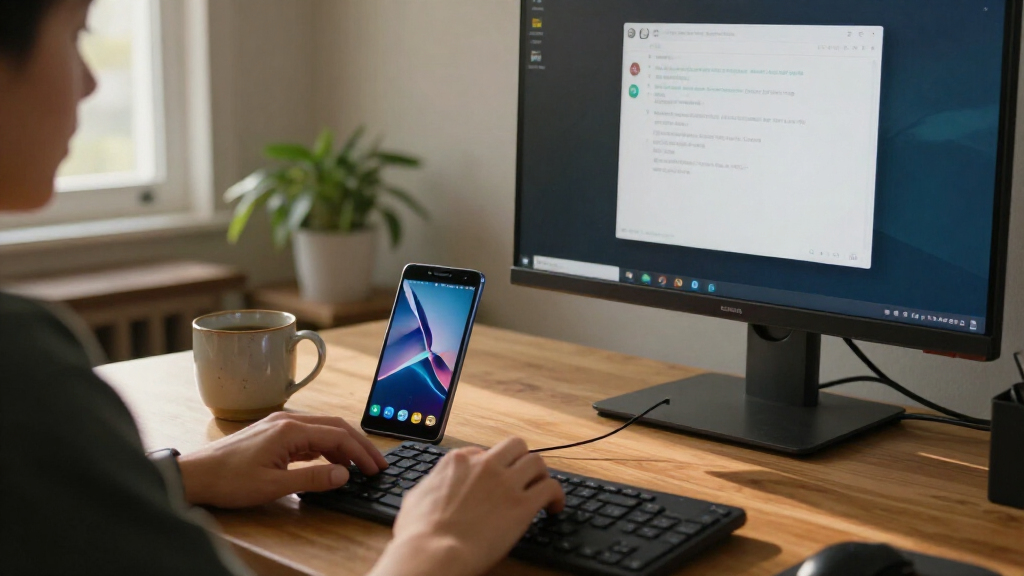
Could DeX be Galaxy’s most overlooked feature? A phone in desktop mode
Samsung DeX brings supported Galaxy phone apps to a monitor in a desktop-style layout. It may suit short, familiar tasks, with usefulness shaped by app and device support.
A bigger screen for everyday work
DeX keeps phone apps and data while arranging them for a monitor.
Email and documents
Chrome, Gmail and Google Docs are among the apps the author found useful on a larger display.
Basic computing
Browsing, streaming and minor edits can give a compatible phone another role.
Not every PC task
Demanding software and apps that do not adapt well remain limitations.
Choose a connection
The report describes both wired and wireless DeX; wireless support depends on the device and display setup.
- Connect a monitor with a compatible USB-C-to-HDMI hub.
- Power pass-through can keep the phone charged during longer sessions.
- A keyboard and mouse can make the setup more practical.
- Use wireless DeX where the specific phone and display support it.
- Check compatibility before relying on a particular setup.
- Samsung’s older DeX Station and DeX Pad may not suit newer phones.
Check before buying
The report does not provide a complete model list or full setup cost.
Confirm that your specific phone supports DeX.
See whether the apps you need work well in the desktop interface.
For wired use, check the monitor input and choose a compatible adapter.
A Phone for Short Desktop Tasks
DeX matters because it can make hardware people already own useful in another way. For someone away from a laptop, a Galaxy phone connected to a monitor may be enough to check email, browse websites, join a group call or make minor edits. That can be convenient for an urgent task, travel or a shared workspace where a screen is available but a computer is not.
The feature may also give an older compatible phone a second role as a basic media and browsing station. XDA describes using DeX for streaming, local media and Android games, including as a simple setup for children or parents. It is not presented as a full substitute for every PC: demanding software, specialized workflows and apps that do not adapt well remain limits. Its practical value is in small, familiar tasks rather than matching a computer in every respect.
Products Worth Considering

Logitech MX Master 4 Ergonomic Wireless Mouse with Haptics – Graphite

Jackery Explorer 300 Portable Power Station, 292Wh

LG 27GS60QC-B Ultragear 27-inch Curved Gaming Monitor (QHD, 180Hz, 1ms, 1000R)
As an affiliate, we earn on qualifying purchases.
From Galaxy S8 to Monitor Mode
Samsung introduced DeX with the Galaxy S8 series, positioning it as a way to use a phone on a larger display. The basic idea is to keep the phone’s apps and data while presenting them through a desktop-oriented interface. XDA’s account reflects the author’s experience with the current version, which they describe as more usable than they had expected; it does not provide a formal benchmark or a model-by-model compatibility list.
There are several ways to connect. The report focuses on a wired display using an adapter, while noting that DeX also supports wireless use. Samsung has also sold dedicated DeX Station and DeX Pad docks. XDA says those older accessories can offer cleaner connections and extra ports but may be expensive and are not compatible with the latest phone models, so the author does not recommend buying them for most new setups.
““The closest thing that you can get to an actual desktop mode.””
— XDA Developers author
Compatibility Depends on the Setup
Exact compatibility varies: the source does not list every supported Galaxy model, Android version or app, and it does not specify which phone was used for the author’s tests. App behavior also differs, so readers should not assume that every Android app will fit a monitor or support desktop-style windows. The article offers personal impressions rather than controlled comparisons with Windows or Linux computers.
The practical cost depends on what a user already owns. A monitor, hub, keyboard, mouse and power supply may be needed for a wired workstation, and the report does not give a full cost for the complete setup. It also does not establish how well DeX handles sustained workloads, all video calls or more demanding games. The author mentions third-party game software for some high-end phones, but does not provide a broader compatibility or performance assessment.
Check Your Phone Before Connecting
Galaxy owners interested in trying DeX can first check whether their phone supports the feature and whether their preferred apps work in its desktop interface. For a wired setup, the next practical step is to confirm the monitor’s available input and choose a compatible USB-C-to-HDMI adapter with power pass-through if the phone will be used for extended sessions. Those who prefer not to buy accessories can look into wireless DeX support on their specific device.
No new Samsung announcement or update to DeX is reported in the source. The immediate takeaway is a suggestion to test the feature with existing equipment, rather than a newly announced product or change. Broader questions about future model support, app improvements and Samsung’s plans for DeX remain unanswered by the article.
Key Questions
What is Samsung DeX?
DeX is a desktop-style interface for supported Samsung Galaxy devices. It displays phone apps and controls in a layout designed for a larger screen.
Does DeX require a monitor adapter?
Not always. The XDA report says DeX can work wired or wirelessly. Its wired monitor setup uses a USB-C-to-HDMI hub; wireless use depends on the phone and display setup.
Can DeX replace a laptop?
It may handle basic browsing, email, documents and media, but the report does not show that it can replace a laptop for all software or demanding work. The experience also depends on app support.
What accessories are useful for wired DeX?
A compatible USB-C-to-HDMI hub connects the phone to a display. A power source and keyboard and mouse can make longer sessions more comfortable; a hub with power pass-through can support charging while connected.
Does DeX work on every Galaxy phone?
No model-by-model compatibility list is included in the source. Support depends on the device, so owners should check their specific phone before buying accessories.
Source: XDA Developers