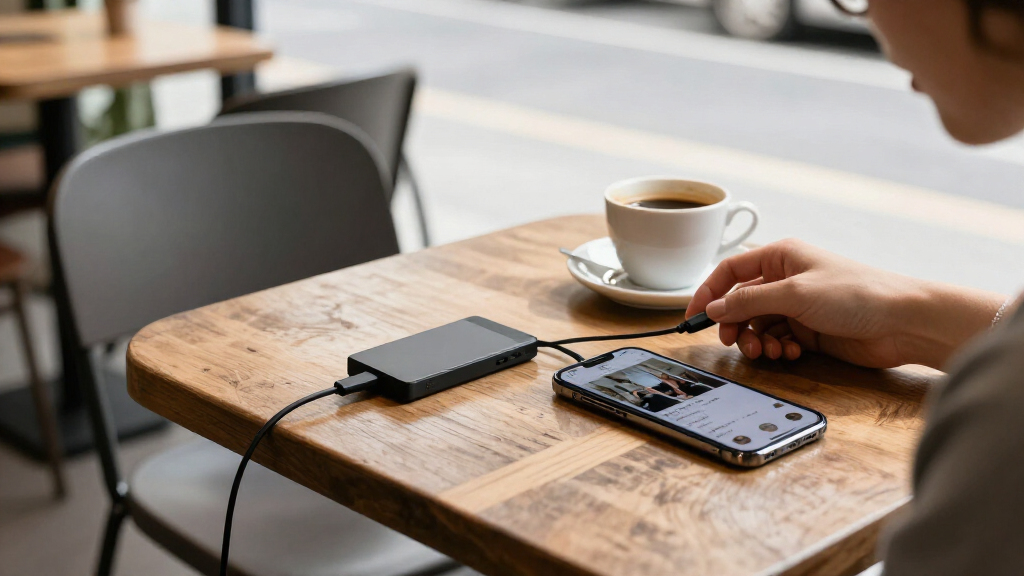
Among these portable SSDs for smartphones, I’d start with the Lexar 2TB ES5 as the best overall fit for phone creators: it pairs magnetic mounting with ample storage and support for compatible phone-video workflows. The Netac ZX20 II stands out for buyers who want magnetic attachment and claimed speeds up to 2,000MB/s, while the Lexar Go with Hub suits people who need extra connection options in a compact setup. The main tradeoffs are phone compatibility, real-world transfer speed, capacity, and how the drive attaches. A fast drive cannot overcome a phone’s port or recording limits, and magnetic mounting is useful only when your phone and case cooperate. Read on for the full comparison, selection criteria, and advice on matching a drive to your phone.

Get the latest gadgets delivered free with Prime
- Fast, free delivery on millions of items
- Prime Video, Amazon Music and more included
- Member-only deals all year
Complete the kit



Key Takeaways
Magnetic mounting is a standout convenience, not a universal feature. The Lexar ES5 and Netac ZX20 II are the clearest choices for a phone-mounted setup, but buyers should check phone and case compatibility before relying on magnets.
A 2,000MB/s claim does not guarantee faster phone transfers. The phone’s USB interface, cable, app, and recording format can limit performance, so the 1,050MB/s-class Lexar Go, SSK, and SanDisk options may be enough for many users.
Capacity changes the job a drive can do. The 64GB Aiibe and 250GB SSK or Netac models are better suited to light transfers than a large video archive; 1TB and 2TB options leave more room for ongoing capture.
The Lexar Go Hub models prioritize connection flexibility. Their hub design can help when a phone recording setup needs additional ports, while the smaller standalone Lexar Go is the simpler choice for basic storage.
Ruggedness and phone-first features are different priorities. SanDisk’s 2TB Extreme adds IP65 water and dust resistance, while the Creator Phone SSD and magnetic models are more directly shaped around phone workflows.
| Netac 1TB ZX20 II Snap and Go Magnetic Portable SSD |  | Best Magnetic 1TB All-Rounder | Capacity: 1TB | Maximum read speed: Up to 2000MB/s | Maximum write speed: Up to 1700MB/s | VIEW LATEST PRICE | See Our Full Breakdown |
| Aiibe 64GB External Solid State Drive USB-C and USB-A |  | Best for Simple Phone File Transfers | Capacity: 64GB | Maximum read speed: Up to 450MB/s | Maximum write speed: Up to 350MB/s | VIEW LATEST PRICE | See Our Full Breakdown |
| Lexar 2TB ES5 Magnetic External SSD |  | Best Premium Phone-Video Drive | Capacity: 2TB | Maximum read speed: Up to 2000MB/s | Maximum write speed: Up to 2000MB/s | VIEW LATEST PRICE | See Our Full Breakdown |
| Lexar 1TB Go Portable SSD with Hub |  | Best for a Phone-Camera Rig | Capacity: 1TB | Maximum read speed: Up to 1050MB/s | Maximum write speed: Up to 1000MB/s | VIEW LATEST PRICE | See Our Full Breakdown |
| 512GB Magnetic Portable SSD, USB 3.2 Gen 2×2 |  | Best Compact Magnetic ProRes Pick | Capacity: 512GB | Maximum read speed: Up to 2000MB/s | Maximum write speed: Up to 1800MB/s | VIEW LATEST PRICE | See Our Full Breakdown |
| Lexar 1TB Go Portable SSD | 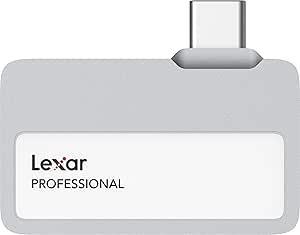 | Best for Cable-Free Phone Recording | Capacity: 1TB | Interface: USB 3.2 Gen 2 | Connector: USB-C | VIEW LATEST PRICE | See Our Full Breakdown |
| SanDisk 1TB Creator Phone SSD |  | Best for MagSafe Phone Rigs | Capacity: 1TB | Interface: USB | Connector: USB-C | VIEW LATEST PRICE | See Our Full Breakdown |
| SSK Portable SSD 1TB |  | Best for Cross-Device Transfers | Capacity: 1TB | Interface: USB 3.2 Gen 2 | Maximum read speed: 1,050MB/s | VIEW LATEST PRICE | See Our Full Breakdown |
| SSK Portable SSD 250GB |  | Best Compact-Capacity Option | Capacity: 250GB | Listed interface: USB 2.0/3.0 | Maximum read speed: 1,050MB/s | VIEW LATEST PRICE | See Our Full Breakdown |
| OSCOO 512GB External SSD Drive |  | Best for Dual-Port Cable-Free Connectivity | Capacity: 512GB | Connector types: USB-C and USB-A | Listed interface: USB 3.2 Gen 2×2 | VIEW LATEST PRICE | See Our Full Breakdown |
| SanDisk 2TB Extreme Portable SSD |  | Best for Rugged, High-Capacity Phone Backups | Capacity: 2TB | Read speed: Up to 1050MB/s | Write speed: Up to 1000MB/s | VIEW LATEST PRICE | See Our Full Breakdown |
| Lexar 2TB Go Portable SSD with Hub | | Best for Phone Filmmakers Who Need Peripherals | Capacity: 2TB | Read speed: Up to 1050MB/s | Write speed: Up to 1000MB/s | VIEW LATEST PRICE | See Our Full Breakdown |
| Lexar D70E 1TB Dual Drive External SSD |  | Best for Switching Between USB-C and USB-A | Capacity: 1TB | USB-C read/write speeds: Up to 2000MB/s read and 1800MB/s write | USB-A read/write speeds: Up to 1000MB/s read and 900MB/s write | VIEW LATEST PRICE | See Our Full Breakdown |
| Netac ZSlim 250GB Portable SSD |  | Best Compact Pick for Light Phone Storage | Capacity: 250GB | Read speed: Up to 550MB/s | Write speed: Up to 450MB/s | VIEW LATEST PRICE | See Our Full Breakdown |
| SanDisk 1TB Portable SSD (New Model) |  | Best Simple Everyday Phone Backup Drive | Capacity: 1TB | Read speed: Up to 1000MB/s | Write speed: Lower than read speed; exact figure not specified | VIEW LATEST PRICE | See Our Full Breakdown |
| portable SSDs for smartphone | Capacity | Interface | Weight | Maximum read speed |
|---|---|---|---|---|
| Netac 1TB ZX20 II Snap and Go | 1TB | USB 3.2 Gen 2 | 0.08kg | Up to 2000MB/s |
| Aiibe 64GB External Solid Stat | 64GB | USB 3.2 Gen 1 | — | Up to 450MB/s |
| Lexar 2TB ES5 Magnetic Externa | 2TB | USB-C; USB 3.2 Gen 2×2 performance listed | 4.16 ounces | Up to 2000MB/s |
| Lexar 1TB Go Portable SSD with | 1TB | USB 3.2 Gen 2 | 0.17kg | Up to 1050MB/s |
| 512GB Magnetic Portable SSD | 512GB | USB 3.2 Gen 2×2 | 0.08kg | Up to 2000MB/s |
| Lexar 1TB Go Portable SSD | 1TB | USB 3.2 Gen 2 | 13g | 1,050MB/s |
| SanDisk 1TB Creator Phone SSD | 1TB | USB | 1.92 ounces | 1,000MB/s |
| SSK Portable SSD 1TB | 1TB | USB 3.2 Gen 2 | 36.6g | 1,050MB/s |
| SSK Portable SSD 250GB | 250GB | — | — | 1,050MB/s |
| OSCOO 512GB External SSD Drive | 512GB | — | — | — |
| SanDisk 2TB Extreme Portable S | 2TB | USB-C, USB 3.2 Gen 2 | — | — |
| Lexar 2TB Go Portable SSD with | 2TB | USB 3.2 Gen 2, USB-C | — | — |
| Lexar D70E 1TB Dual Drive Exte | 1TB | USB 3.2 Gen 2×2 USB-C; USB-A | 55g | — |
| Netac ZSlim 250GB Portable SSD | 250GB | USB 3.2 Gen 2, USB-C | Approximately 30g | — |
| SanDisk 1TB Portable SSD | 1TB | — | 1.12 ounces | — |
More Details on Our Top Picks
Netac 1TB ZX20 II Snap and Go Magnetic Portable SSD
The Netac ZX20 II balances a useful 1TB capacity with a magnetic attachment, so it can stay against a compatible phone while you shoot or transfer files. Its stated speeds of up to 2000MB/s read and 1700MB/s write are higher than the Lexar Go’s 1050MB/s read specification, making the Netac the more speed-focused choice on paper. The included USB-C-to-C and USB-C-to-A cables also make it easier to move between phones and computers without relying on one connector.
The tradeoff is that its magnetic feature and speed claims are most useful when your phone and connection support the workflow; the product data does not list a water-resistance rating. Unlike the Lexar ES5, it does not list an IP rating or an automatic backup app. I’d choose it for flexible everyday phone storage, not for a shoot that needs documented weather protection.
Pros:- Magnetic snap-on design helps keep the drive attached to a compatible phone during handheld use
- 1TB capacity offers substantially more room than the 64GB Aiibe
- Includes USB-C-to-C and USB-C-to-A cables for broader device connections
- Lists up to 2000MB/s read and 1700MB/s write speeds
Cons:- No dust- or water-resistance rating is provided in the product details
- Maximum listed speeds depend on compatible host devices and interfaces
- Smaller capacity than the 2TB Lexar ES5
Best for: Phone owners who want a magnetic 1TB drive for video files and regular transfers between USB-C phones, laptops, and USB-A computers
Not ideal for: Outdoor creators who need a stated dust- and water-resistance rating, or buyers who specifically need a 2TB drive
- Capacity:1TB
- Maximum read speed:Up to 2000MB/s
- Maximum write speed:Up to 1700MB/s
- Interface:USB 3.2 Gen 2
- Connections included:USB-C to USB-C and USB-C to USB-A cables
- Phone video support:Direct 4K/60Hz ProRes recording listed for iPhone 16/15 Pro and Pro Max
- Attachment:Built-in magnetic attachment
- Housing:Aluminium housing with reinforced inner frame
- Weight:0.08kg
Our verdict“Choose the Netac ZX20 II if you want a magnetic 1TB phone drive with high stated speeds and both USB-C and USB-A cable options.”
Aiibe 64GB External Solid State Drive USB-C and USB-A
The Aiibe 64GB is the straightforward pick for moving a modest collection of photos, documents, or short clips between a phone and other devices. Its built-in USB-C and USB-A connectors avoid carrying a separate cable, while the keychain loop makes the drive easy to keep with everyday gear. The stated read speed of up to 450MB/s is below the 1050MB/s listed for the Lexar Go and far below the magnetic Netac ZX20 II, but that gap matters less for occasional file copies than for sustained video work.
Capacity is the defining compromise: 64GB is far less room than the 512GB magnetic SSD in this roundup, so it suits transfers and backups of selected files rather than a large video library. The metal body and protective covers add a practical layer of durability, though the listing does not give an IP rating. I’d skip it for high-bitrate recording or anyone who wants a roomy phone-attached drive.
Pros:- Dual USB-C and USB-A connectors work without carrying a separate cable
- Compact keychain-loop design keeps it accessible on a bag or key ring
- Zinc-alloy body and included flip covers offer physical protection
- Works across listed Windows, Android, Linux, and Mac OS systems
Cons:- 64GB capacity is much lower than the other drives in this group
- 450MB/s maximum read speed trails the Lexar Go and faster magnetic SSDs
- No formal dust- or water-resistance rating is listed
Best for: Phone users who mainly shuttle documents, photos, and smaller video collections between USB-C phones and USB-A computers
Not ideal for: Mobile filmmakers, frequent large-file movers, or anyone who needs hundreds of gigabytes of working space
- Capacity:64GB
- Maximum read speed:Up to 450MB/s
- Maximum write speed:Up to 350MB/s
- Interface:USB 3.2 Gen 1
- Connectors:USB-C and USB-A
- Body material:Zinc alloy
- Operating system compatibility:Windows, Android, Linux, and Mac OS listed
- Dimensions:2.8 x 2.8 x 0.35 inches
Our verdict“Pick the Aiibe for convenient everyday file shuttling, but choose a larger, faster SSD for phone video recording or growing media archives.”
Lexar 2TB ES5 Magnetic External SSD
The Lexar ES5 is the most capable fit here for creators who want a phone-mounted drive with substantial room for demanding footage. It pairs 2TB capacity with listed read and write speeds up to 2000MB/s, and supports Apple ProRes at 4K120fps plus Samsung Pro Video at 8K 30fps. That makes it a stronger specialist choice than the 1TB Netac ZX20 II for long shoots, while the Lexar Go with Hub is a better match when connecting a microphone, light, or power matters more than top stated transfer speeds.
Its MagSafe-compatible attachment, included metal ring, IP65 rating, and 3-meter drop-resistance claim add useful phone-shooting flexibility. The caveat is host performance: Lexar says speeds may be lower on systems that do not support USB 3.2 Gen 2×2. It is also USB-C only, so it lacks the Netac’s included USB-A cable option.
Pros:- 2TB capacity provides the most listed storage among these five products
- Supports Apple ProRes 4K120fps and Samsung Pro Video 8K 30fps recording
- MagSafe-compatible design includes a metal ring for devices without a magnetic surface
- IP65 dust and water resistance and stated 3-meter drop resistance
Cons:- Listed peak speeds may be lower on systems without USB 3.2 Gen 2×2 support
- USB-C connection does not offer the included USB-A cable flexibility of the Netac ZX20 II
- More features and capacity may be unnecessary for buyers who only move small files
Best for: Mobile videographers who need large capacity, magnetic phone mounting, and support for high-resolution ProRes or Samsung Pro Video recording
Not ideal for: Casual users who only need simple photo transfers, or buyers whose phone or computer cannot make use of the drive’s higher-speed interface
- Capacity:2TB
- Maximum read speed:Up to 2000MB/s
- Maximum write speed:Up to 2000MB/s
- Interface:USB-C; USB 3.2 Gen 2×2 performance listed
- Phone attachment:MagSafe-compatible; metal ring included
- Video recording support:Apple ProRes 4K120fps and Samsung Pro Video 8K 30fps
- Ingress protection:IP65
- Drop resistance:Up to 3 meters
- Weight:4.16 ounces
Our verdict“Choose the Lexar ES5 for demanding phone video workflows that benefit from 2TB, magnetic mounting, and a stated ruggedness rating.”
Lexar 1TB Go Portable SSD with Hub
The Lexar Go with Hub earns its place by treating a smartphone as a small production setup rather than just a storage source. Its four-port USB-C hub can connect accessories such as a microphone, light, or power while the SSD records, and the listing describes up to 30W power supply support. That makes it more useful for a creator building a phone rig than the magnetic Lexar ES5, which prioritizes high-speed storage and rugged protection instead of extra ports.
The modular drive can also be used on its own, and its compact plug-in connector avoids a loose cable at the phone. The tradeoff is speed: up to 1050MB/s read and 1000MB/s write are below the Lexar ES5’s stated 2000MB/s figures. The drive must also be firmly inserted, and its compatibility listing excludes iPhone 17. I’d choose it for accessory connectivity, not maximum capacity or universal phone fit.
Pros:- Four-port USB-C hub supports a more connected smartphone filming setup
- Up to 30W power supply support is listed for longer shoots
- Modular design lets the compact SSD be used without the hub
- IP65 dust and water resistance is listed
Cons:- 1050MB/s read and 1000MB/s write ratings are below the Lexar ES5’s stated speeds
- Listed smartphone compatibility excludes iPhone 17
- The plug-in connector must be fully seated, and the hub adds parts to manage
Best for: Phone filmmakers who need to connect a microphone, light, or power alongside an SSD during a mobile shoot
Not ideal for: iPhone 17 owners, buyers seeking a magnetic mount, or creators prioritizing 2TB capacity and the highest listed transfer speeds
- Capacity:1TB
- Maximum read speed:Up to 1050MB/s
- Maximum write speed:Up to 1000MB/s
- Interface:USB 3.2 Gen 2
- Hub ports:Four USB-C ports
- Power support:Up to 30W power supply support listed
- Ingress protection:IP65 dust and water resistance
- Drop resistance:1 meter
- Weight:0.17kg
Our verdict“Choose the Lexar Go with Hub when connecting phone-shooting accessories matters more than magnetic mounting or peak SSD speed.”
512GB Magnetic Portable SSD, USB 3.2 Gen 2×2
This 512GB magnetic SSD is aimed at creators who want a compact phone-mounted drive for high-frame-rate footage without carrying a larger 1TB or 2TB model. It lists up to 2000MB/s read and 1800MB/s write, with support for 4K120fps ProRes HDR recording on iPhone 16 Pro Max. Its stated dimensions are about 2.32 by 2.3 inches, and its weight is 0.08kg, giving it a smaller-capacity alternative to the 2TB Lexar ES5 while retaining a magnetic attachment and fast stated transfers.
The compromise is storage: 512GB fills sooner than the Netac ZX20 II’s 1TB, especially during long video sessions. The listing also ties its 2000MB/s transfer claim to a 20Gbps computer interface, so compatible hardware matters; it provides no IP rating. The included magnetic ring broadens phone fit, but the product description specifies USB-C devices. I’d pick it for focused shoots, not a large always-on archive.
Pros:- Magnetic attachment and an extra ring extend use to compatible non-MagSafe devices
- Lists up to 2000MB/s read and 1800MB/s write
- Supports 4K120fps ProRes HDR recording on iPhone 16 Pro Max
- Compact 0.08kg body is lighter than the listed Lexar Go with Hub
Cons:- 512GB offers half the capacity of the Netac ZX20 II and one quarter of the Lexar ES5
- Maximum transfer performance depends on a compatible 20Gbps interface
- No IP dust- or water-resistance rating is provided
Best for: Mobile creators who want a compact magnetic SSD for iPhone 16 Pro Max 4K120fps ProRes HDR recording and selected video projects
Not ideal for: People recording long sessions who need more than 512GB, or buyers who require a stated water- and dust-resistance rating
- Capacity:512GB
- Maximum read speed:Up to 2000MB/s
- Maximum write speed:Up to 1800MB/s
- Interface:USB 3.2 Gen 2×2
- Phone video support:4K120fps ProRes HDR recording listed for iPhone 16 Pro Max
- Attachment:Magnetic; additional magnetic ring included
- Dimensions:2.32 x 2.3 x 0.28 inches
- Weight:0.08kg
Our verdict“Choose this drive for a compact magnetic setup and high-frame-rate phone recording, provided 512GB is enough for your shoots.”
Lexar 1TB Go Portable SSD
The Lexar 1TB Go is the most direct fit here for someone who wants storage attached to a phone without managing a loose cable. Its built-in USB-C connector plugs straight into compatible devices, and the drive’s 13-gram, ultracompact design is easier to carry than the cabled SSK drives. Lexar specifies read speeds up to 1,050MB/s and write speeds up to 1,000MB/s, with support for recording Apple ProRes 4K at 60 fps on compatible iPhone models. The tradeoff is the plug-in form: a phone case or awkward port placement can obstruct the connector, and Lexar advises pressing it fully into the port. Unlike the SanDisk Creator Phone SSD, it has no MagSafe attachment, so it hangs from the phone rather than mounting against it.
Pros:- Built-in USB-C connector avoids carrying a separate cable.
- Very light 13-gram design suits pockets and compact phone rigs.
- Up to 1,050MB/s read and 1,000MB/s write speeds support fast transfers and compatible ProRes recording.
- IP65 dust and water resistance adds protection for travel and outdoor use.
Cons:- Direct-plug design can be awkward with some phone cases or port layouts.
- No MagSafe attachment, unlike the SanDisk Creator Phone SSD.
- The listed 1TB capacity is less suited to creators who keep extensive footage on one drive.
Best for: iPhone 15 Pro or newer users who record ProRes and want a tiny, cable-free drive for mobile shoots.
Not ideal for: People who use a thick or obstructive phone case, need a magnetic mount, or want a drive that can sit separately from the phone on a cable.
- Capacity:1TB
- Interface:USB 3.2 Gen 2
- Connector:USB-C
- Maximum read speed:1,050MB/s
- Maximum write speed:1,000MB/s
- Weight:13g
- Durability:IP65 dust and water resistance
- Compatible devices:Smartphones, tablets, Macs, PCs, and cameras with USB-C
Our verdict“Choose the Lexar 1TB Go if pocket-size, cable-free connection matters more than magnetic mounting or flexible cable placement.”
SanDisk 1TB Creator Phone SSD
The SanDisk Creator Phone SSD suits creators who want the drive secured to the back of a MagSafe-compatible phone rather than dangling from its port. Its magnetic ring and included USB-C cable make a tidy mobile recording setup, while IP65 protection and stated drop protection up to three meters give it a tougher travel profile than the compact, direct-plug Lexar 1TB Go. SanDisk lists read speeds up to 1,000MB/s and support for ProRes 4K at 60 fps on specified iPhone Pro models, so it is aimed squarely at video capture and quick editing from external storage. The added mounting convenience comes with bulk: at 3.25 by 2.7 inches and 1.92 ounces, it occupies more space than Lexar’s 13-gram drive. MagSafe alignment also depends on a compatible phone or case.
Pros:- Magnetic ring attaches to compatible phones for a more integrated mobile rig.
- Included USB-C cable lets the drive sit away from the phone port.
- IP65 dust and water resistance plus stated three-meter drop protection suit outdoor use.
- Supports ProRes 4K at 60 fps on specified iPhone Pro models.
Cons:- Larger and heavier than the direct-plug Lexar 1TB Go.
- Magnetic mounting requires a compatible phone or case.
- Maximum listed read speed of 1,000MB/s is below the 1,050MB/s claims of the Lexar and SSK 1TB drives.
Best for: iPhone 15 Pro/Pro Max or iPhone 16 Pro/Pro Max creators who want a magnetically mounted drive for ProRes recording.
Not ideal for: Buyers seeking the smallest possible drive, or smartphone users without a MagSafe-compatible phone or case.
- Capacity:1TB
- Interface:USB
- Connector:USB-C
- Maximum read speed:1,000MB/s
- Dimensions:3.25 × 2.7 × 0.43 inches
- Weight:1.92 ounces
- Durability:IP65 dust and water resistance; stated drop protection up to 3 meters
- Included accessories:USB cable, quick-start guide, safety and warranty guide
Our verdict“Pick this SanDisk if a MagSafe-mounted setup and rugged protection matter more than the smallest footprint.”
SSK Portable SSD 1TB
The SSK Portable SSD 1TB is the practical pick for people who move files between a phone and computers with different ports. It includes both USB-C and USB-A cables, avoiding the connector juggling that the direct-plug Lexar 1TB Go can require when switching away from a phone. Its aluminum enclosure weighs 36.6g, and the maker lists read speeds up to 1,050MB/s and write speeds up to 1,000MB/s; the SLC cache is intended to keep transfers brisk within its available capacity. For phone use, the product description also cites ProRes HDR capture on compatible iPhones. The compromise is a conventional cabled drive: it is less integrated into a phone rig than the MagSafe-equipped SanDisk Creator Phone SSD, and sustained transfers beyond the cache may not match peak claims.
Pros:- Includes USB-C and USB-A cables for a broad mix of devices.
- Up to 1,050MB/s read and 1,000MB/s write speeds suit large file transfers.
- Aluminum enclosure weighs 36.6g and is described as helping dissipate heat.
- SMART diagnostics, TRIM support, and SLC caching are specified.
Cons:- Requires a cable, making a phone-mounted recording setup less tidy than the SanDisk Creator Phone SSD.
- No IP water or dust rating is provided in the supplied product information.
- Peak transfer behavior is tied to the available SLC cache capacity.
Best for: Phone users who regularly back up or shuttle large files among USB-C smartphones, USB-A computers, and tablets.
Not ideal for: Creators who want a magnetic phone mount, a cable-free connection, or substantial ruggedness certification for exposed outdoor shoots.
- Capacity:1TB
- Interface:USB 3.2 Gen 2
- Maximum read speed:1,050MB/s
- Maximum write speed:1,000MB/s
- Enclosure:Aluminum alloy
- Weight:36.6g
- Included cables:USB-C and USB-A
- Additional features:LED activity indicator, SMART diagnostics, TRIM support, SLC cache
Our verdict“Choose the SSK 1TB if flexible USB-C and USB-A connections matter more than a phone-specific mounting design.”
SSK Portable SSD 250GB
The SSK Portable SSD 250GB keeps the same small aluminum design and headline speed claims as the 1TB SSK, but its capacity makes it a better fit for selective transfers than a full video archive. It lists up to 1,050MB/s read and 1,000MB/s write, along with USB-C and USB-A connectivity in the product description, so it can serve as a fast handoff drive between compatible phones and computers. SMART diagnostics, TRIM support, and an LED activity light add useful management cues. Against the SSK 1TB, the obvious concession is how quickly 250GB can fill with high-bitrate ProRes footage; against the Lexar 1TB Go, this model also needs a cable rather than plugging directly into the phone. The product data lists USB 2.0/3.0 under its interface field, so buyers should check device and cable compatibility rather than assume every connection reaches peak speed.
Pros:- Up to 1,050MB/s read and 1,000MB/s write speeds are specified.
- Compact aluminum enclosure weighs 36.6g.
- USB-C and USB-A cables are described for transfers across device types.
- SMART diagnostics, TRIM support, and an activity LED are listed.
Cons:- 250GB can fill quickly with high-resolution phone video.
- Cabled connection is less convenient for phone recording than the direct-plug Lexar 1TB Go.
- The supplied interface details list USB 2.0/3.0, creating some uncertainty around peak-speed compatibility.
Best for: Phone owners who need a small, fast transfer drive for selected clips, project files, or periodic backups rather than a large media library.
Not ideal for: People recording frequent long-form ProRes video or keeping a large phone archive on one drive; 250GB offers far less headroom than the SSK 1TB.
- Capacity:250GB
- Listed interface:USB 2.0/3.0
- Maximum read speed:1,050MB/s
- Maximum write speed:1,000MB/s
- Enclosure:Aluminum
- Form factor:Portable external SSD
- Additional features:SMART diagnostics, TRIM support, LED activity indicator
- Compatible devices:Gaming consoles, laptops, and smartphones
Our verdict“Choose this 250GB SSK for occasional fast file transfers, but step up to the 1TB version if phone video is a regular workload.”
OSCOO 512GB External SSD Drive
The OSCOO 512GB External SSD stands out for combining USB-C and USB-A connections in a push-pull, cable-free design. That can make it convenient to move between a compatible smartphone and a computer without packing a separate lead, while its zinc-alloy body is described as shock resistant and designed to dissipate heat. The listing claims speeds up to 1,100MB/s and support for 4K 120 fps ProRes recording on iPhone 15, 16, and 17 series, though it also notes that peak performance depends on the host interface. Its 512GB capacity sits between the 250GB SSK and the 1TB options here, offering more room for active projects without matching their storage headroom. Compared with the MagSafe-based SanDisk, it lacks a phone-mounting system; the projecting connector design may also be less suitable when a phone is moving during a shoot.
Pros:- Push-pull USB-C and USB-A design avoids carrying a separate cable.
- 512GB capacity provides more working space than the 250GB SSK.
- Zinc-alloy body is described as shock resistant and heat dissipating.
- Listing claims up to 1,100MB/s and 4K 120 fps ProRes support on specified iPhone generations.
Cons:- Projecting connector can place leverage on the phone port during movement.
- No magnetic phone attachment, unlike the SanDisk Creator Phone SSD.
- The listed peak speed depends on using a compatible host interface.
Best for: Creators with compatible USB-C phones who want a compact drive that can connect to both USB-C and USB-A devices without carrying a cable.
Not ideal for: Users who need MagSafe mounting, a flexible cable connection, or confirmed ProRes frame-rate support for a phone not specified by the listing.
- Capacity:512GB
- Connector types:USB-C and USB-A
- Listed interface:USB 3.2 Gen 2×2
- Maximum listed speed:Up to 1,100MB/s
- Enclosure:Zinc alloy
- Design:Push-pull, cable-free connector
- Additional features:TRIM, SMART monitoring, LDPC ECC, wear leveling
- Listed phone compatibility:iPhone 15, 16, and 17 series
Our verdict“Pick the OSCOO if you want a cable-free dual-connector drive and 512GB is enough for your active phone projects.”
SanDisk 2TB Extreme Portable SSD
The SanDisk Extreme 2TB is the stronger fit for phone owners who record a lot and need a drive built for travel, rather than the smallest possible attachment. Its IP65 water and dust resistance, stated drop protection up to 3 meters, and carabiner loop make it easier to carry on shoots or trips than the simpler SanDisk Portable SSD. Capacity is its clearest advantage: it offers twice the space of that 1TB model, while rated read and write speeds suit large video transfers when the phone and connection can support them. The tradeoff is a larger, cable-connected setup instead of the Lexar Go SSD’s direct-plug form and hub options. It also requires the included software for Mac password protection, so the security feature adds setup rather than working as a phone-native safeguard.
Pros:- 2TB capacity provides substantial room for phone video and photo archives.
- IP65 water and dust resistance and stated drop protection up to 3 meters suit outdoor carrying.
- Carabiner loop helps attach the drive to a bag or belt loop.
- Rated speeds reach up to 1050MB/s read and 1000MB/s write.
Cons:- Requires a cable rather than plugging directly into a phone.
- Bulkier carry setup than the ultracompact Lexar Go SSD.
- Mac password protection requires a software download and is not a phone-native security feature.
Best for: Phone videographers and frequent travelers who need 2TB of storage, rugged protection, and a drive they can secure to a bag.
Not ideal for: People who want a tiny drive that plugs directly into a phone, or buyers who need a hub for microphones, lighting, and power.
- Capacity:2TB
- Read speed:Up to 1050MB/s
- Write speed:Up to 1000MB/s
- Interface:USB-C, USB 3.2 Gen 2
- Water and dust resistance:IP65
- Drop protection:Up to 3 meters, per product description
- Security:256-bit AES hardware encryption with password protection
- Carry feature:Carabiner loop
Our verdict“Choose this SanDisk when ruggedness and 2TB capacity matter more than a direct-plug design or a built-in hub.”
Lexar 2TB Go Portable SSD with Hub
The Lexar 2TB Go with Hub is the most purpose-built choice here for a phone video setup: use the ultracompact SSD on its own, or add the hub’s four USB-C ports for accessories such as microphones, lights, or a power bank. That flexibility distinguishes it from the SanDisk Extreme 2TB, which prioritizes a rugged carry design over expanding a filming rig. Lexar lists up to 1050MB/s read and 1000MB/s write and says the drive supports ProRes recording on compatible iPhones, but those results depend on the phone, app, and connection. The removable hub also means more pieces to pack, and the product description calls the drive 13 grams while the specifications list 0.17 kg, so the listed weight is inconsistent. Buyers who just need backups can choose a simpler drive.
Pros:- Four USB-C ports on the hub can accommodate compatible filming accessories.
- SSD can be used on its own when a smaller carry setup is preferred.
- 2TB capacity and rated speeds up to 1050MB/s read and 1000MB/s write suit large media files.
- Product description cites support for Apple ProRes recording on compatible iPhones.
Cons:- Hub, adapters, and cables add pieces to pack compared with a direct-plug SSD.
- The listed weight is inconsistent: 13 grams in the description versus 0.17 kg in specifications.
- High transfer and recording performance depends on compatible phones and connections.
Best for: iPhone filmmakers who want external storage plus ports for a microphone, light, or power bank while recording or working on footage.
Not ideal for: Casual phone users who only need photo backups and do not want to carry or configure a separate hub and its accessories.
- Capacity:2TB
- Read speed:Up to 1050MB/s
- Write speed:Up to 1000MB/s
- Interface:USB 3.2 Gen 2, USB-C
- Hub ports:Four USB-C ports
- Included accessories:Adapters and cables
- Recording use:Product description cites Apple ProRes support on compatible iPhones
- Listed weight:Inconsistent product data: 13g in description; 0.17kg in specifications
Our verdict“Pick the Lexar Go with Hub if your phone shoots video alongside accessories; skip the hub if straightforward storage is all you need.”
Lexar D70E 1TB Dual Drive External SSD
The Lexar D70E earns its place through connector flexibility: its integrated USB-C and USB-A connectors let you move files between a compatible phone and older computers without keeping a separate adapter cable on hand. That makes it more convenient for mixed-device workflows than the cable-connected SanDisk Extreme 2TB, though the SanDisk offers double the capacity and more explicitly detailed weather protection. The D70E is also light at 55g and has a metal housing with a lanyard loop, making it straightforward to carry. Its headline 2000MB/s read and 1800MB/s write speeds apply to USB-C with USB 3.2 Gen 2×2; USB-A is rated lower, and the product notes performance may fall on systems that do not support the faster standard. At 1TB, it may also fill quickly for long-form phone video.
Pros:- Integrated USB-C and USB-A connectors reduce the need for separate cables or adapters.
- Compact 55g metal design includes a lanyard loop.
- Rated USB-C speeds reach up to 2000MB/s read and 1800MB/s write on compatible systems.
- Lexar App supports automatic photo and video backups.
Cons:- USB-A speeds are lower than the USB-C headline speeds.
- USB-C performance depends on support for USB 3.2 Gen 2×2, which may not be available on a phone or computer.
- 1TB offers less room than the 2TB SanDisk Extreme and Lexar Go options.
Best for: Phone users who regularly transfer files between USB-C smartphones and USB-A computers and want one compact drive for both.
Not ideal for: People with large video libraries who need 2TB, or buyers whose phone and computer cannot benefit from the faster USB-C interface.
- Capacity:1TB
- USB-C read/write speeds:Up to 2000MB/s read and 1800MB/s write
- USB-A read/write speeds:Up to 1000MB/s read and 900MB/s write
- Interface:USB 3.2 Gen 2×2 USB-C; USB-A
- Weight:55g
- Dimensions:3.13 × 1.19 × 0.31 inches
- Housing:Metal, with integrated lanyard loop
- Backup feature:Lexar App supports automatic photo and video backup
Our verdict“Choose the D70E for cable-free USB-C-to-USB-A file handoffs, provided your devices support its connector and speed requirements.”
Netac ZSlim 250GB Portable SSD
The Netac ZSlim 250GB is a sensible small-capacity option for someone who wants to offload documents, selected photos, or a modest batch of clips without carrying a large archive drive. At about 30g and 100 × 29.4 × 9mm, it is easy to tuck into a pocket, while the aluminum enclosure gives it a firmer feel than a tiny plastic thumb drive. Its rated 550MB/s read and 450MB/s write are below the SanDisk Extreme 2TB and the Lexar Go models, so it is less suited to repeated large video transfers. The included USB-C-to-A cable and adapter support varied connections, but add a small accessory to keep track of. The main limitation is capacity: unlike those larger drives, 250GB can be restrictive for phone owners recording high-resolution video.
Pros:- Approximately 30g and slim dimensions make it easy to carry.
- Aluminum-alloy enclosure provides a solid everyday carry housing.
- Includes a USB-C-to-A cable and USB-A-to-C adapter for compatible device connections.
- Supports compatible Android, Windows, macOS, and Linux systems.
Cons:- 250GB capacity is limited for large phone video libraries.
- Rated speeds are lower than the SanDisk Extreme and Lexar Go options.
- Requires an included cable or adapter rather than plugging directly into a phone.
Best for: Students and everyday phone users who need a lightweight drive for documents, selected photos, and occasional file transfers.
Not ideal for: Mobile video creators who routinely record large 4K or ProRes files and need faster transfers or more than 250GB.
- Capacity:250GB
- Read speed:Up to 550MB/s
- Write speed:Up to 450MB/s
- Interface:USB 3.2 Gen 2, USB-C
- Dimensions:100 × 29.4 × 9mm
- Weight:Approximately 30g
- Enclosure:Aluminum alloy
- Included connections:USB-C-to-A cable and USB-A-to-C adapter
Our verdict“Choose the ZSlim for light, portable phone storage, but opt for a larger and faster drive if video is your main use.”
SanDisk 1TB Portable SSD (New Model)
The SanDisk 1TB Portable SSD is the straightforward pick for phone owners who want a familiar, cable-connected drive for moving photos and videos without paying for a hub or specialist rugged features. Its USB-C connection and plug-and-play description keep the setup simple, and the stated 2-meter drop protection adds reassurance for everyday carrying. Rated read speeds reach 1000MB/s, close to the SanDisk Extreme 2TB’s 1050MB/s, but this model provides half the capacity and its description says write speeds are lower without giving a specific figure. The Extreme is the better match for outdoor use thanks to its stated IP65 rating and carabiner loop; the Lexar Go is more convenient for direct-plug filming setups. This SanDisk’s appeal is its uncomplicated middle ground, not the most rugged or accessory-rich design.
Pros:- 1TB capacity suits routine photo and video backups.
- USB-C connection is described as plug-and-play with no driver setup.
- Rated read speed reaches up to 1000MB/s.
- Stated drop protection up to 2 meters and pocket-sized design support everyday carrying.
Cons:- Write speed is described as lower than the read speed but is not specified.
- Provides less capacity than the 2TB SanDisk Extreme and Lexar Go models.
- No stated IP water-and-dust rating or accessory hub.
Best for: Phone owners who want a simple 1TB USB-C drive for routine photo and video backups, with no hub or complex setup.
Not ideal for: Outdoor shooters needing a stated water-and-dust rating, or filmmakers who want a direct-plug SSD and accessory hub.
- Capacity:1TB
- Read speed:Up to 1000MB/s
- Write speed:Lower than read speed; exact figure not specified
- Connection:USB Type-C
- Drop protection:Up to 2 meters
- Weight:1.12 ounces
- Dimensions:1.77 × 3.35 × 0.39 inches
- Included accessory:USB cable
Our verdict“Choose this SanDisk for uncomplicated 1TB phone backups; pick the Extreme for tougher outdoor use or the Lexar Go for a filming rig.”
How We Picked
I ranked these drives for smartphone use first, rather than treating peak transfer speed as the whole story. I looked at stated phone compatibility, USB-C connection details, magnetic attachment or included hub features, capacity, portability, and protective design where specified. A drive’s listed speed is a manufacturer claim, not a promise of the same result on every phone; the phone port, cable, file system, and recording app can all affect actual performance.
The leading spots go to options that combine practical phone handling with enough capacity and a clear use case. The Lexar ES5 ranks ahead of speed-focused alternatives because its magnetic design and stated support for compatible phone video workflows make it especially phone-oriented. The Netac ZX20 II and high-speed 512GB magnetic SSD offer another route for mounted capture, while Lexar Go, SSK, and SanDisk models cover compact everyday storage. Lower-capacity drives rank lower for sustained video use, and general-purpose models are better matches for buyers who value ruggedness or broad device use over phone-specific features.
Factors to Consider When Choosing Portable SSDs For Smartphones
I’d choose a phone SSD by working backward from how I plan to record, move, and store files. A useful match depends on the phone’s connection and recording support as much as the drive’s headline specifications. These broader checks can prevent a fast or feature-rich purchase from becoming an awkward phone accessory.
Check Phone, Port, and Recording Compatibility
Start with the exact phone model and the kind of files you expect to record or transfer. USB-C describes the connector shape, but it does not tell you the phone’s data rate or whether a particular camera app can record directly to external storage. Check the phone maker’s documentation and the app’s supported recording formats before paying extra for a high-speed drive. Some video features are limited to specific phone generations, storage formats, or software versions. A drive can still serve as a file backup when direct recording is unavailable, but that is a different workflow. I’d treat compatibility as a pass-or-fail requirement, then compare speed and extras among drives that pass.
Match Capacity to the Way You Capture
Think about how often you can offload footage and whether the SSD will be a temporary shuttle or your main working archive. Small capacities such as 64GB or 250GB can make sense for occasional transfers, but they leave little room for long shoots or several days away from a computer. A 1TB drive is a practical middle ground for many creators; 2TB makes more sense when files stay on the drive for extended periods. Usable space will be lower than the stated capacity because formatting and system overhead take room. Avoid choosing a drive based only on today’s storage needs if your phone is likely to record larger files later. Conversely, don’t carry extra capacity you rarely use if a smaller drive already fits your routine.
Read Speed Claims in the Phone’s Context
Advertised read and write figures are useful for comparing models, but they may reflect ideal conditions on compatible computer hardware. Smartphone performance can be limited by its port, cable, power behavior, or the app handling the file. For direct video capture, sustained write performance matters more than a short peak number; for moving finished clips to a computer, read speed can matter more. Check whether a product clearly states both read and write speeds, since a headline figure may describe only one direction. A higher-rated SSD can still be a sensible buy for later computer transfers, but it may not make phone recording faster. I’d pay for a speed tier only when the phone and workflow can use it.
Choose a Mounting Style You Can Actually Use
A magnetic SSD can keep the drive close to the phone and reduce dangling cable movement while recording. That convenience depends on a compatible magnetic phone or case, and it does not replace checking that the drive stays secure during movement. A cable-connected drive offers more flexibility across devices but can snag, pull at the port, or make a handheld setup less comfortable. Hubs add connection options for a more involved rig, though they can increase bulk and create more parts to manage. Before buying, consider where the SSD will sit while you shoot and whether the cable or mounting method interferes with your grip. For occasional backups, a plain compact drive may be easier than a mount designed for filming.
Factor in Protection, Heat, and Handling
Phone recording often happens outdoors or on the move, so enclosure design matters alongside speed. A stated dust and water-resistance rating can help with exposure, but it does not mean a drive is suitable for every wet or dirty environment; follow the maker’s limits and keep connectors protected. Metal housings may feel sturdy, yet they can still become warm during sustained transfers and need room for heat to dissipate. A rugged drive may be less convenient to mount or pocket than a slim phone-oriented model. Also account for the cable: a poor fit or loose connector can interrupt transfers regardless of the SSD’s internal performance. If the drive will hold the only copy of important footage, plan a second backup rather than treating portability as data protection.
Decide Whether Extras Earn Their Space
Hubs, magnetic mounts, dual connectors, and bundled cables can simplify a particular setup, but each adds another compatibility point. A hub is most useful when you know which devices or accessories you need to connect; otherwise, it can add bulk without changing your everyday phone workflow. Dual USB-C and USB-A connections may help when moving files between newer phones and older computers, though a short adapter or cable can sometimes solve the same problem. Check what is actually included and whether the product’s connector layout fits your case and accessories. Keep an eye on file-system support too, since a drive formatted for one device may need reformatting or a different setup for another. I’d favor a useful, verified extra over a long feature list that does not solve a real workflow problem.
Frequently Asked Questions
Will any of these SSDs record video directly from my phone?
Not automatically. Direct recording depends on the phone model, operating-system version, camera app, file format, and external-storage support, not just the SSD’s connector. The Lexar ES5 listing calls out support for compatible Apple ProRes and Samsung Pro Video workflows, but buyers should confirm their specific phone and app requirements. Other listed drives can still be useful for transferring or backing up files even if direct capture is unavailable. Check the phone maker’s guidance before building a recording setup around an SSD.
Is a 2,000MB/s SSD worth choosing for a smartphone?
It can be, but the figure alone is not a reason to buy one. The phone’s port and recording workflow may cap performance below the drive’s stated maximum, so a 1,000–1,050MB/s-class model may feel just as suitable for everyday phone transfers. A faster drive can still help when connected to a compatible computer or used in a workflow that benefits from higher throughput. Compare both stated read and write speeds, and check whether the phone can use them. If it cannot, prioritize capacity, mounting, or durability instead.
Should I choose a magnetic SSD or a cable-connected one?
Choose magnetic attachment when you plan to keep the drive mounted while filming and your phone or case supports a secure fit. It can make a phone rig neater, but it may be less useful for buyers who mainly transfer files at a desk or use several devices. A cable-connected SSD is easier to share across phones, tablets, and computers, though the cable can snag during handheld recording. Hub models suit more complex setups but bring extra bulk. Your usual shooting position and case compatibility should decide this more than the mounting feature alone.
Is a 64GB or 250GB SSD enough for phone video?
It can work for short-term transfers or occasional clips, but it leaves limited room for frequent high-resolution recording. Video file sizes vary with resolution, frame rate, codec, and recording length, so estimate storage using your actual camera settings rather than a general rule. Smaller drives may suit a traveler who offloads footage regularly or someone who wants a compact secondary copy. For longer shoots or an archive that stays on the SSD, a 1TB or 2TB option is a safer fit. Leave some free space rather than planning to fill the drive completely.
Can I use one portable SSD with my phone and computer?
Often, yes, but connector fit is only one part of compatibility. The phone and computer must support the drive’s file system, and some workflows may require reformatting, which erases existing files. A format that works across your devices can be convenient, but check support for the file sizes and features you need before changing it. USB-A or dual-connector options can help with older computers, while USB-C models may need an adapter for some ports. Keep another copy of important files before reformatting or moving a large archive.
Conclusion
For most phone creators, I’d choose the Lexar 2TB ES5 as the best overall because it combines magnetic mounting, generous capacity, and stated support for compatible phone-video workflows. The best value fit depends on the job: the 1TB Lexar Go or SSK offers a more straightforward 1,050MB/s-class option, while the smaller-capacity Aiibe is best reserved for light transfers rather than a video library. For a premium phone-first setup, compare the ES5 with the Netac ZX20 II and the 512GB magnetic SSD, checking your phone’s recording limits before choosing on speed claims alone. Beginners may prefer a simple 1TB USB-C drive such as the SanDisk Portable SSD or standalone Lexar Go over a hub-heavy setup. If your specific need is a hub, look at the Lexar Go with Hub; if it is stated dust and water resistance, consider the SanDisk Extreme. My final choice would be the smallest, simplest drive that meets your phone’s compatibility, capacity, and recording needs.
Halloween Picks
halloween
As an affiliate, we earn on qualifying purchases.