📊 Full opportunity report: Acoustic Dampening, Placement, and the “Rig in the Closet” Setup on ThorstenMeyerAI.com — validation score, market gap, and execution plan.

Get the latest gadgets delivered free with Prime
- Fast, free delivery on millions of items
- Prime Video, Amazon Music and more included
- Member-only deals all year
TL;DR
This article explores how relocating AI workstations and proper placement can significantly reduce noise. It highlights the importance of ventilation when placing rigs in enclosed spaces and explains why distance is the most effective fix.
Moving AI workstations out of the immediate workspace into separate rooms or closets is the most effective way to reduce noise. This approach minimizes the need for acoustic treatment and is particularly suited for headless operation over a network, making it a practical solution for many users.
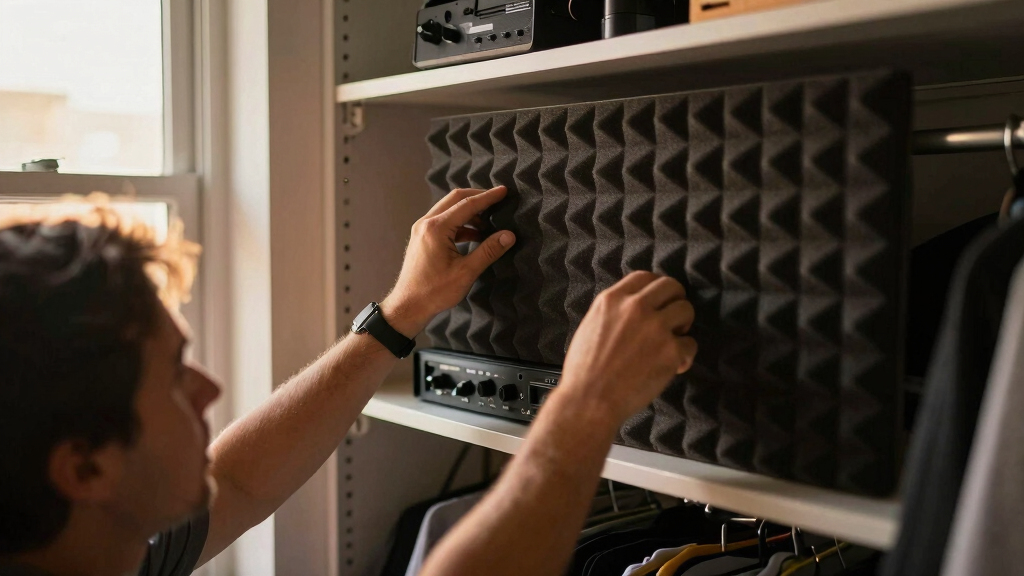
The primary method to reduce noise from high-performance AI rigs is to increase physical distance from the user. Placing the machine in another room or closet, and operating it headless over a network, eliminates most noise concerns. This setup relies on a stable wired or wireless connection and adequate ventilation to prevent overheating. Placing a rig in a closet or enclosed space can trap heat, which poses a risk of thermal throttling and hardware damage. To mitigate this, active ventilation—such as exhaust fans or ducted airflow—is essential. Purpose-built soundproof cabinets combine acoustic lining with temperature management, offering a balanced solution for noise and heat dissipation. The effectiveness of this approach hinges on ensuring proper airflow to prevent heat buildup, especially in sealed environments.Acoustic dampening
& the rig in the closet.
The most powerful noise fix isn’t a material — it’s a floor plan. A rig you can’t hear because it’s in another room beats any amount of foam. Tap the approaches in Part 1 to see what actually works.
(another room)
(levers 1–4)
(door / barrier)
(acoustic foam)
Contain the noise, not the heat
Why Placement and Ventilation Are Critical for Quiet AI Workstations
For users working with high-power AI hardware, noise can be a significant distraction or disturbance, especially in shared or office environments. Proper placement, such as moving the rig into a separate room or closet, offers a straightforward and highly effective way to eliminate noise at the source. This approach reduces reliance on expensive acoustic treatments and simplifies setup. Furthermore, managing heat in enclosed spaces is crucial to prevent hardware throttling and damage. Ventilation solutions like exhaust fans or ducted airflow ensure the rig remains cool, maintaining performance and longevity. Overall, strategic placement combined with effective heat management can dramatically improve workspace comfort and productivity, making it a vital consideration for AI practitioners.
AI workstation noise reduction enclosure
As an affiliate, we earn on qualifying purchases.
As an affiliate, we earn on qualifying purchases.
Understanding Heat and Noise Dynamics in AI Workstations
High-performance AI rigs, especially those with GPUs consuming over 600W, generate significant heat and noise. Traditional solutions focus on acoustic foam and soundproofing, but these are often less effective than spatial separation. Moving the rig to a different room or closet is increasingly common, aligning with the fact that network-based interaction renders physical proximity less necessary.
However, placing a hot, enclosed machine requires careful ventilation. Without proper airflow, heat buildup can cause thermal throttling, increased fan noise, and potential hardware failure. Purpose-built soundproof cabinets with integrated cooling solutions have emerged as a practical compromise, providing both noise reduction and heat dissipation.
"The most effective fix for noisy AI rigs isn’t acoustic foam — it’s distance. Moving the machine into another room can make the noise disappear without complex treatments."
— Thorsten Meyer, AI workstation expert
As an affiliate, we earn on qualifying purchases.
What Remains Unclear About Enclosed Placement Strategies
While the benefits of moving rigs to separate rooms are well established, the optimal design and implementation of soundproof cabinets with integrated cooling are still evolving. The long-term reliability of various ventilation and sealing methods in different environments requires further study. Additionally, specific temperature thresholds and noise levels acceptable for various hardware configurations are not yet universally standardized.
As an affiliate, we earn on qualifying purchases.
Next Steps in Optimizing AI Workstation Noise Management
Further research into cost-effective, scalable soundproofing and cooling solutions is expected. Manufacturers are likely to develop more integrated enclosures that balance noise reduction with thermal management. Users should monitor hardware temperatures and noise levels to refine their setups, and industry standards may emerge to guide best practices for enclosed AI workstation placement.
As an affiliate, we earn on qualifying purchases.
Key Questions
Is moving my AI rig to another room always the best solution?
Moving the rig to another room is often the most effective fix for noise, especially if network access is reliable. It minimizes noise at the source and reduces the need for complex acoustic treatments.
What ventilation options are recommended for enclosed setups?
Active ventilation, such as exhaust fans or ducted airflow, is essential. Purpose-built soundproof cabinets with integrated cooling are ideal but more expensive. Ensuring proper airflow prevents heat buildup and hardware throttling.
Can acoustic foam alone significantly reduce noise from an AI workstation?
No. Acoustic foam absorbs reflections within a room but does not block airborne or structure-borne noise. It should be combined with barriers and placement strategies for effective noise reduction.
Are there risks to placing a high-power GPU in a sealed closet?
Yes. Without proper ventilation, heat can accumulate, leading to thermal throttling, reduced performance, or hardware damage. Ventilation and temperature management are critical.
Source: ThorstenMeyerAI.com
Fall Picks
fall essentials
As an affiliate, we earn on qualifying purchases.